


Money Flex AI: Build the Cash Routine One Shot at a Time
A low camera, an absurd stack of cash, and a perfectly serious face. Break down a real Money Flex AI example and plan your own version with practical prompts.
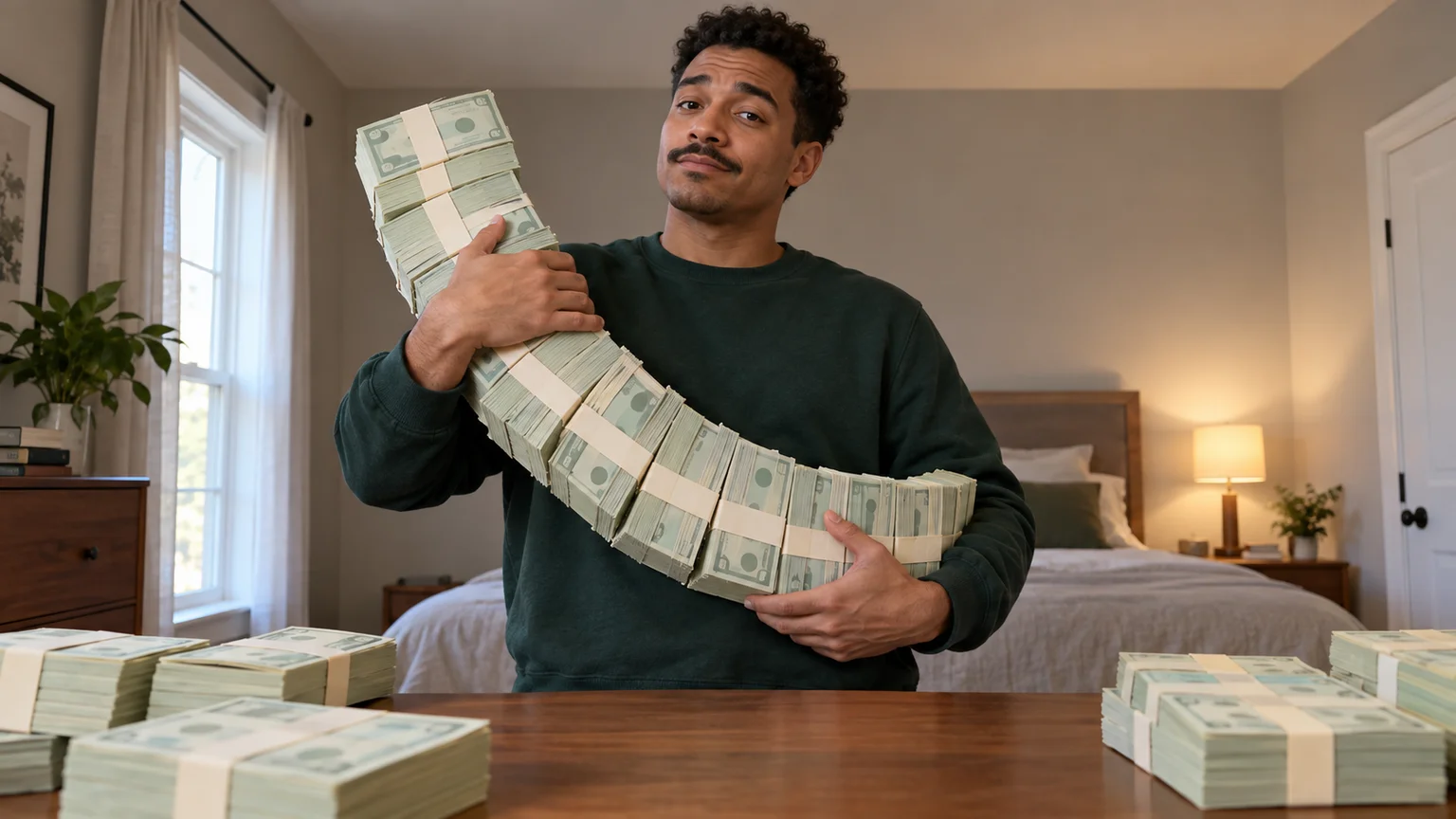
The funniest part is the ordinary bedroom. Someone stands behind a dresser holding an unreasonable amount of cash, looking as though this happens every morning. Money Flex AI turns that contrast into a short performance: the money gets bigger, the gestures get closer, and the expression barely changes.
This tutorial uses a publicly shared dog clip to study the effect, then develops an original human version on ImgToImage AI. The Money Flex AI workflow below combines a prepared image with short video prompts. It is a shot plan you can follow, rather than a claim that one prompt reproduces the original performance exactly.
What a real Money Flex AI example teaches
A useful public example is the dog cash-flex reel credited to @clash on Instagram. In this Money Flex AI clip, a black-and-white dog stands upright in a bedroom, with a bed and ceiling fan behind it. The camera stays low while the cash moves toward the viewer.
These approximate moments describe the publicly displayed fourteen-second version; reposts may start at a different point.
| Moment | What appears on screen | What to borrow for your shot |
|---|---|---|
| Opening | A long curve of bundled notes rests against the dog's chest. | Establish the oversized prop immediately. |
| Around 4 seconds | The bundles swing outward across the foreground. | Let perspective make the movement feel large. |
| Around 9 seconds | A smaller stack moves close to the camera. | Change the prop's scale between shots. |
| Around 13 seconds | A broad fan of notes fills much of the view. | Give the ending a distinct silhouette. |
The Money Flex AI lesson is about staging: the familiar room makes the impossible performance readable. You can carry that contrast into a personal remake without copying the creator's identity or claiming their clip as your own.
Plan three manageable shots for Money Flex AI
A continuous Money Flex AI routine asks the model to coordinate fingers, loose paper, bundles, and changing grips. For a first attempt, divide those tasks. You can join the successful clips in a video editor afterward, retaining only the strongest seconds from each.
Plan three beats for your Money Flex AI edit:
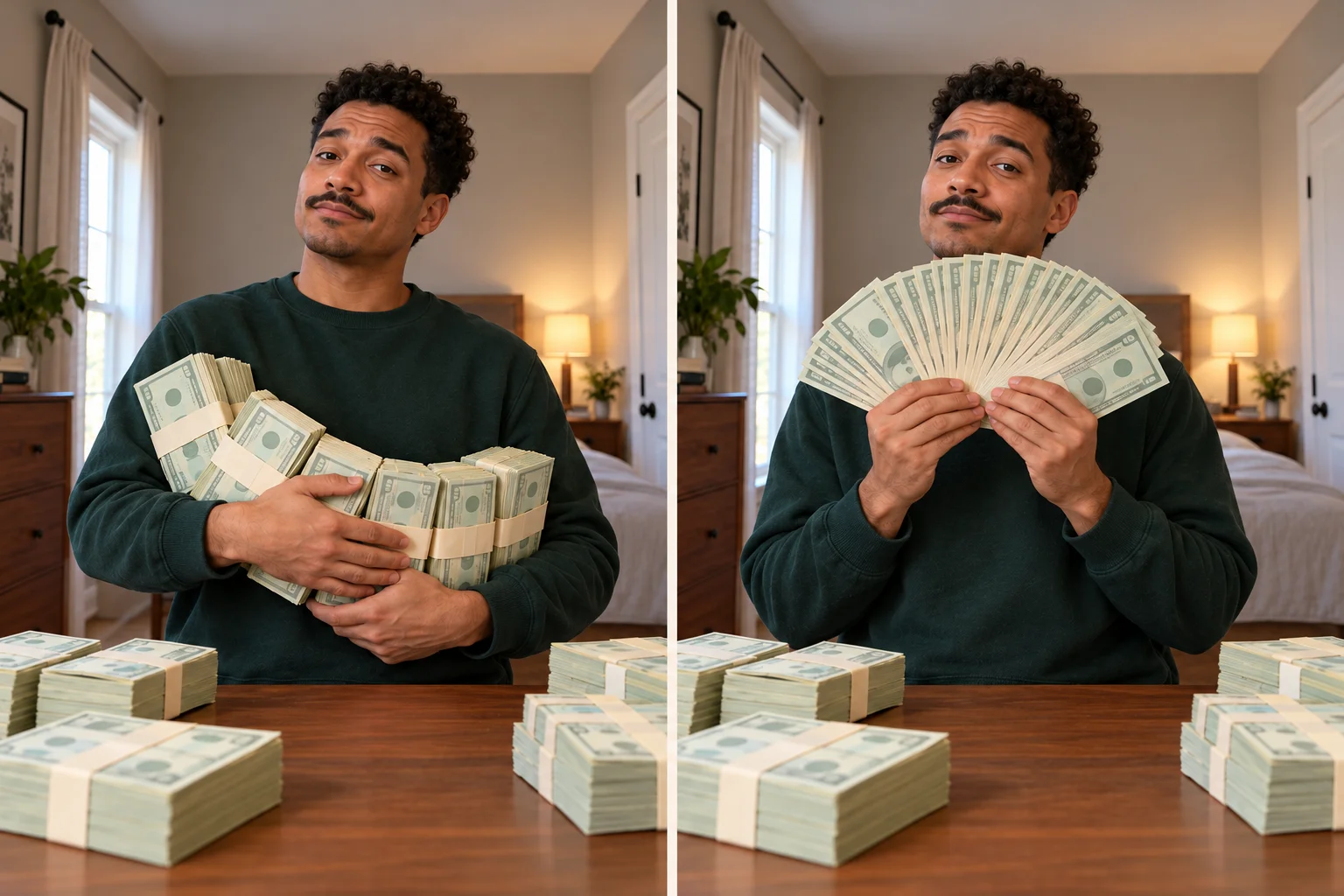
- The introduction: hold the bundles against the chest and glance toward the lens. Let the viewer understand the situation before anything moves quickly.
- The show-off: extend the bundles a short distance forward. A low camera exaggerates their size without requiring a complicated throw and catch.
- The finish: present an already opened fan of bills, then tilt it slightly. This provides a clear ending without generating every individual note unfolding.
Decide the joke before generating. For this Money Flex AI example, the character behaves as if an absurd cash delivery is a minor inconvenience. That gives the face a specific job: remain unimpressed while the hands do the showing off.
Build a Money Flex AI starting image
Open the image workspace and choose a model that accepts a reference photo. Use one adult subject with a clearly visible face, shoulders, and arms. A waist-up portrait gives Money Flex AI more useful information about posture than a tightly cropped selfie.
The outfit can stay ordinary. A plain sweatshirt separates the hands and paper from the torso; a busy graphic shirt makes those boundaries harder to judge. Keep the background recognizable but quiet, with enough space between the person and the bed or wall.
For Money Flex AI, put the cash into the prepared image before animation. This establishes the grip, prop size, and lighting together. You do not need a photograph of yourself holding actual money; ask the image model to build the fictional scene around your reference.
Try this starting-image prompt:
Use the uploaded adult as the identity reference. Show them from the waist up behind a wooden dresser in an ordinary bedroom, wearing a dark green sweatshirt. A low stationary phone camera looks slightly upward. Both hands support a curved row of oversized banded prop-cash bundles across the chest. The face is fully visible with one eyebrow slightly raised. Leave space around both elbows. Place several separate bundles on the tabletop. Soft window light, natural skin texture, believable hands, plain fictional banknote designs, no captions or logos.
Inspect the image at full size before moving on. Money Flex AI needs a readable grip: look for fingers passing through paper, a wrist bending sharply, or a bundle attached to clothing. Correct those details in the still so the video starts from a coherent pose.
Make the first Money Flex AI take
Go to the video workspace, sign in, and choose Seedance 2.0 Mini. Select Frames / Start & end frames, then upload the prepared image to Start. Leave End empty for this first Money Flex AI attempt. Use a JPEG, PNG, or WebP within the model's 10 MB image limit.
Choose 9:16 for a vertical post and prepare a matching portrait image rather than relying on a severe crop. Start with five seconds at 720p. The model supports four to fifteen seconds; Money Flex AI does not need the maximum duration to establish one gesture. Review the displayed credit estimate before generating.
Use a motion prompt that describes one physical action:
The person keeps the same face, green sweatshirt, and unimpressed expression. Holding the curved row of prop-cash bundles with both hands, they slowly extend it a short distance toward the low camera, pause, then draw it back to chest level. The bundles retain their shape and remain supported throughout. The camera, dresser, and background stay stationary. Natural shoulder and elbow movement, subtle breathing, quiet room ambience, one continuous shot.
Evaluate the Money Flex AI result at normal speed first. Does the extension register as a deliberate gesture? Then pause at the furthest point to inspect the wrists and paper. A visually neat still is not enough if the movement between poses looks abrupt.
If the action feels rushed, reduce the travel distance before adding time. Your first Money Flex AI take should establish how confidently the subject can handle the prop. Save the version with the clearest movement for the middle of the edit.
Give the Money Flex AI cash fan its own close-up
For the finishing shot, return to the image workspace and prepare a second image of the same subject in the same room. Keep the lighting and sweatshirt consistent, but replace the bundled chain with a fan already held below the chin. This Money Flex AI setup separates paper arrangement from paper movement.
Download that image and use it as the next video's Start frame. Keep the fan modest enough that both hands remain visible. The Money Flex AI reference ends with a large foreground flourish; your first version can suggest that scale through a small forward movement.
Try this second prompt:
Begin with the person already holding the open fan of fictional paper money below their chin. They tilt the fan slightly from side to side, bring it a little closer to the camera, and stop with a steady look into the lens. Keep the fan connected at the grip, with distinct paper edges and stable fingers. Preserve the face, sleeves, tabletop stacks, and bedroom lighting. No camera zoom or cut.
For a Money Flex AI ending, a held pose gives viewers time to register the expression. Trim the clip after that pause. If you prefer the notes covering the mouth, try that as a later variation, once the basic fan remains stable.
When Money Flex AI looks almost right
Fix the earliest visible failure instead of adding a long list of instructions. Money Flex AI combines several delicate objects, so one targeted revision is easier to assess than changing the scene, action, and lighting together.
| What goes wrong | A focused next attempt |
|---|---|
| Fingers fuse into the bundles | Use fewer, thicker bundles in the starting image and expose more of each hand. |
| The cash grows during the extension | Reduce how close it approaches the lens and specify a constant bundle count. |
| The fan turns into a solid sheet | Prepare fewer visible paper layers and request only a slight tilt. |
| The room bends with the subject | Remove camera movement and keep the torso mostly centered. |
Compare Money Flex AI attempts using the same checkpoint: the moment the prop is closest to the viewer. That is where changes in size, grip, and perspective become easiest to spot. Keep the improvement that solves your specific problem, even if another take has more dramatic motion.
Pet Money Flex AI needs a different grip
The dog example works because an animal performs a recognizably human boast. To explore pet Money Flex AI, start with a clear picture showing the animal's chest, front legs, and distinctive markings. Build the upright fictional pose in the image stage and check it before animation.
Simplify the prop to one wide bundle supported between the front paws. A gentle lift or head tilt is a useful first Money Flex AI movement for this version. Ask for furry paws to remain paws; precise note counting introduces much more difficult anatomy. Do not expect a human prompt to transfer unchanged.
Finish Money Flex AI with a timed punchline
Assemble the introduction, extension, and fan in an editor, cutting during a clear gesture rather than an awkward reset. Matching the prop's direction across a cut helps separate Money Flex AI clips feel like one performance. Remove any frames where the hands visibly change shape.
Choose the Money Flex AI soundtrack during editing. The generated audio should not be assumed to contain the original social-media sound. If you want that particular track, check its availability in the platform's music library; otherwise pick music you have permission to use. Align one strong musical accent with the forward extension, then give the final fan a quieter beat to land.
A short caption can supply the context without explaining every move: a payday joke, a fantasy bonus, or a pet demanding a larger treat budget. Present your Money Flex AI video as an AI-made joke, with captions away from the hands and face.
Start in the image workspace, then bring your prepared scene to the video generator. Build the cash gesture you can make convincing, save the strongest take, and give Money Flex AI an ending worth waiting for.
Keep exploring
 Video Guides
Step through the gate and make the path your stage. Create a Fergie Baby AI walk from your photo, with a confident stride, expressive gestures, and a camera that keeps pace.
 Video Guides
An outrageous dunk, a stunned defender, and a cheeky finish. Create a Basketball Middle Finger AI clip with your own cast and a play the camera can follow.
 Video Guides
The party keeps moving, but you stop to stare. Make a Bby Wow Guy AI scene with your photo, a concha, and the awkward pause that makes the joke land.
 Video Guides
Crouch on thin air, glance at the pursuer, and make your getaway. Create a Crazy Frog AI video with a clear riding pose, a moving road, and your own face.