


Crazy Frog AI: Build the Chase Without the Bike
Crouch on thin air, glance at the pursuer, and make your getaway. Create a Crazy Frog AI video with a clear riding pose, a moving road, and your own face.
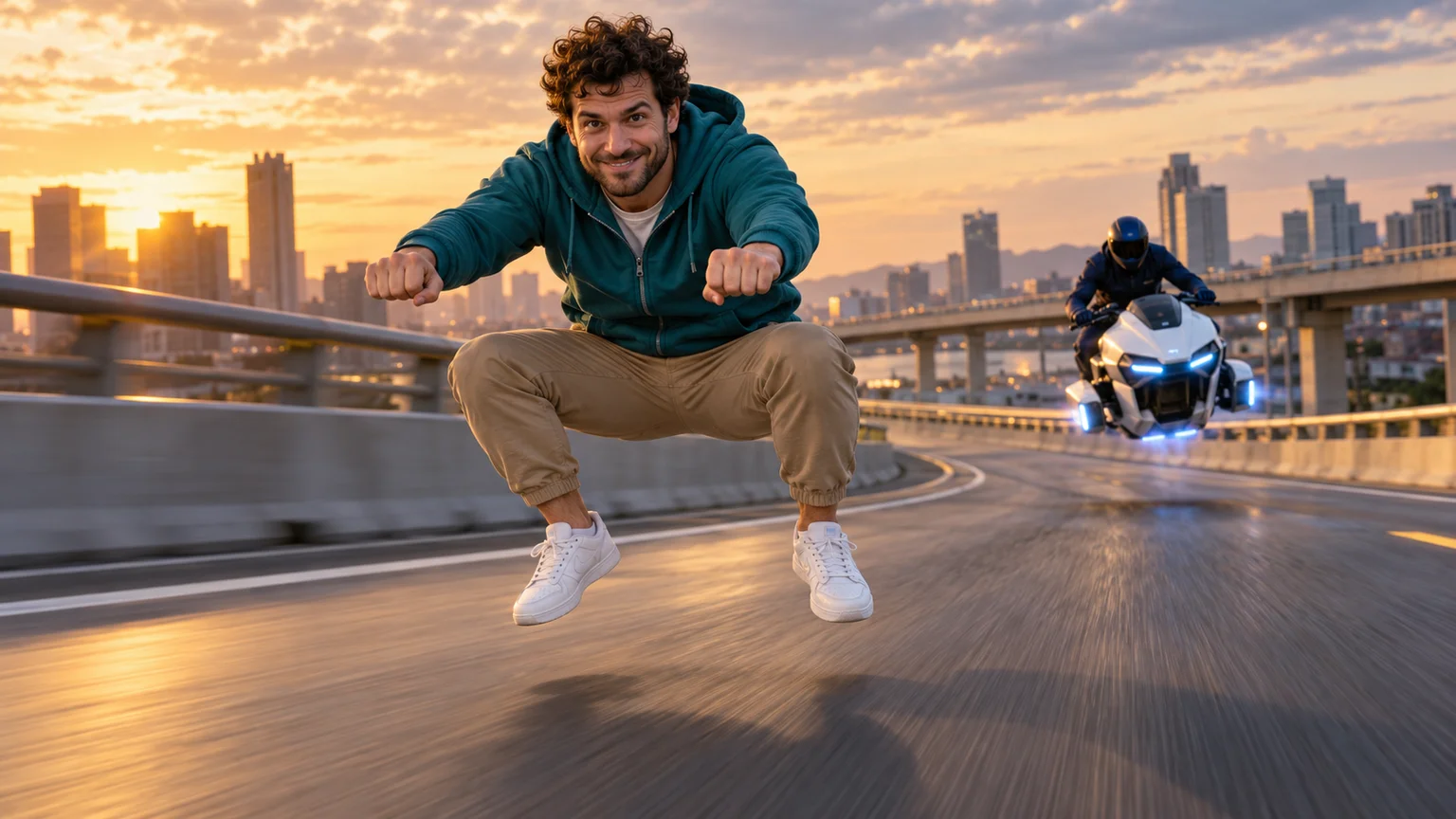
The rider leans forward, grips imaginary handlebars, and speeds along the road with absolutely nothing beneath them. A motorcyclist follows, making the empty space even funnier. Crazy Frog AI turns a familiar face into that impossible getaway: serious chase energy wrapped around a completely missing vehicle.
The trick is keeping the illusion intact. This Crazy Frog AI guide shows you how to establish the floating pose, build a readable pursuit, and direct motion on ImgToImage AI without asking one short clip to handle every stunt at once. Start with the ride; add spectacle after it works.
The visual joke behind Crazy Frog AI
The format takes inspiration from the imaginary motorcycle ride associated with Crazy Frog's “Axel F” music video. Current Crazy Frog AI interpretations often place a person in a low riding squat while a visible motorcycle or futuristic hover-bike follows. Some add a glance backward, a flip, and a sudden escape.
You do not need to transform the person into the cartoon character. In Crazy Frog AI, the contradiction between ordinary clothes and impossible transport carries the joke. Bent knees, steady fists, and a committed expression imply a vehicle that viewers can plainly see is absent.
On this platform, you will generate a new chase from a prepared image and written directions. Crazy Frog AI is the creative concept here, not a named preset inside the video workspace. The process gives you control over the setting and performance without promising an exact copy of a reference clip.
Make the empty space believable
Before planning the chase, solve the silhouette. A convincing Crazy Frog AI rider has hips lowered into a squat, knees bent, forearms extended, and two hands positioned as though holding grips. The feet should hover slightly above the road rather than alternate like running steps.
The view beneath the rider is essential. For Crazy Frog AI, leave a clear gap between the thighs and show road through it. A jacket hanging too far down can resemble a saddle; a dark shape near the shoes can accidentally read as a wheel. Keep the first outfit relatively simple.
Use a soft shadow below the body to establish height. A Crazy Frog AI scene with no shadow may look like a cutout pasted onto a road, while a hard contact shadow beneath each shoe suggests walking. Aim for the visual logic of a low hover rather than a person floating high above traffic.
Choose who escapes and who follows
Use a sharp portrait with visible facial features and, ideally, enough body detail to guide the outfit. Your Crazy Frog AI reference does not need to show a riding pose. Avoid a hand covering the jaw or strong blur around the eyes, since those details matter during the backward glance.
One photo is enough if you want an invented pursuer. For a personal Crazy Frog AI pairing, use a second consenting person's photo and assign them to the following rider. Distinct colors make the roles readable: a teal hoodie in front, for example, and a navy jacket behind.
Consider how much of the second face you actually need. A helmet visor can make a fictional chaser convincing but conceal the friend you hoped to feature. Decide that tradeoff before composing Crazy Frog AI, and establish an unobstructed view if recognizing both people is central to the joke.
Prepare one Crazy Frog AI starting image
Open the AI Image Generator and select an available model that accepts your reference photos. Compose your Crazy Frog AI scene on a quiet elevated road with visible lane lines and guardrails. Those features give the motion model landmarks for showing forward travel.
A three-quarter front view captures the lead's expression, the empty space beneath them, and the pursuer in one frame. Leave room behind and ahead of your Crazy Frog AI rider. A camera pushed tightly against the face loses the missing-bike reveal and leaves little space for the chase.
Adapt this image prompt:
Create a realistic Crazy Frog AI concept image using my reference for the leading adult. Preserve their face, hair, teal hoodie, tan trousers, and white shoes. Place them in a deep motorcycle riding squat, floating just above an empty elevated road at dusk. Their knees are bent and apart, and both fists grip empty air in front of their chest. Show clear road beneath their hips and between their legs. The lead has no vehicle, seat, handlebars, wheels, or supporting object. Add one separate fictional adult in navy clothing on a visible white hover-bike several metres behind. Use a front three-quarter view, complete bodies, a soft shadow below the lead, and consistent road perspective. No text or logos.
If using a friend's portrait, replace the fictional pursuer instruction with their assigned reference and outfit. Inspect the Crazy Frog AI still at full size: both identities, the lead's posture, and the distance between riders should already make sense before you animate it.
Direct a short chase with a clear ending
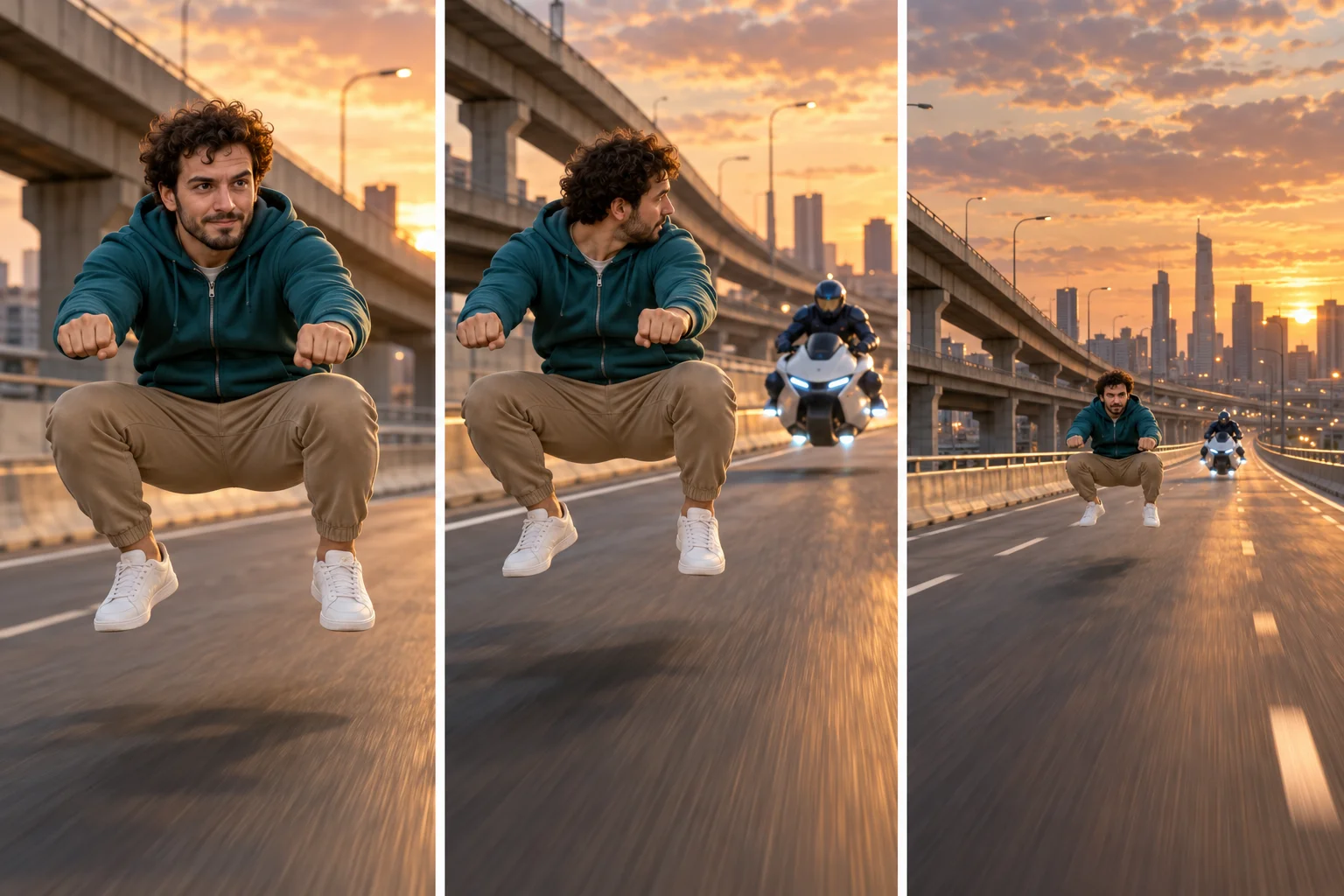
For your first Crazy Frog AI attempt, use three actions: steady riding, a brief glance, and acceleration away. This provides a beginning, interaction, and payoff without forcing an abrupt location change or a difficult aerial rotation into the same shot.
Think of this Crazy Frog AI timing plan as a guide rather than a frame-accurate instruction:
| Part of a ten-second clip | Rider action | Camera and road |
|---|---|---|
| Opening, roughly 0–3 seconds | Hold the floating riding pose | Track beside the lead; lane markings move backward |
| Middle, roughly 3–6 seconds | Turn the head slightly toward the pursuer | Keep both riders separated and traveling the same way |
| Ending, roughly 6–10 seconds | Face forward, lean, and pull away | Widen gently so the growing gap becomes visible |
Avoid asking for a stationary camera, a close tracking shot, and an orbit simultaneously. Crazy Frog AI already contains an impossible subject; the surrounding camera logic should be easy to understand. One continuous direction of travel gives viewers a stable reference for the gag.
Animate Crazy Frog AI on ImgToImage AI
Open the AI Video Generator, sign in, and select Seedance 2.0 Mini. Add the completed Crazy Frog AI scene to Start frame. Leave End frame and Reference images empty for this method; reference images use a separate input mode from frames.
Try ten seconds at 720p. Current controls support 4–15 seconds and 480p or 720p output, with JPEG, PNG, or WebP inputs up to 10 MB. Match your Crazy Frog AI frame shape to the source image and check the credit estimate before starting generation.
Use this motion prompt as your first direction:
Animate this Crazy Frog AI scene as one continuous ten-second chase. The teal-hooded lead maintains a low squat with bent knees and both fists gripping empty air. Their feet remain above the road, with absolutely no vehicle or object appearing beneath them. Track from a front three-quarter angle while lane markings and guardrails move backward. The navy-clad pursuer follows on the single visible white hover-bike, several metres behind and offset to the side. The lead gives one small backward glance, faces forward, leans, and accelerates away. Widen gently to reveal the increasing gap. Preserve the faces, clothing, body proportions, and road layout. No cuts, running steps, position swaps, collisions, or extra vehicles. Use wind and a playful engine buzz without music or speech.
Watch your completed Crazy Frog AI take at normal speed first. Does the road communicate travel, does the glance connect the characters, and does the ending show escape? These questions reveal whether the scene works before small details distract you from the overall motion.
Repair the illusion before adding a stunt
A motorcycle appears under the lead
This is the defining Crazy Frog AI failure: the model completes the object implied by the pose. Remove any bike-like shape from the starting image and distinguish “lead with no vehicle” from “pursuer with one visible bike.” Avoid a general instruction such as “two motorcyclists racing.”
The rider walks, swims, or floats away
Ask for a stable hip height and bent knees throughout the Crazy Frog AI shot. Keep the hands fixed relative to the torso, with the road moving beneath the subject. Reduce bouncing and limb movement before changing the lighting or scenery; those visual changes do not repair posture.
The pursuit changes direction
If the following bike passes through the lead or jumps ahead, simplify Crazy Frog AI staging. Place the pursuer farther back in the source image, keep the camera on one side, and remove crossing movements. A small delay in the chaser's acceleration can make the final gap more readable.
Once these basics hold, experiment with one brief airborne move. A full backward rotation is a harder Crazy Frog AI variation because it hides the face and reverses the silhouette. Generate that as a separate attempt, allow space above the subject, and return to the same crouched pose afterward.
Give the getaway its sound and setting
Wind and an exaggerated engine buzz can sell Crazy Frog AI even without a visible motor. Listen to the generated track separately; lower it if the engine overwhelms the expression or if a siren suggests a different mood than you intended. Add your chosen music during editing.
This Crazy Frog AI workflow does not include the original “Axel F” recording. Use audio available for your account and intended use in the posting app or editor. Align an acceleration or glance with a musical accent, then trim unnecessary waiting at the start.
Change the setting only after the chase works. Crazy Frog AI can move from an overpass to a coastal road or a stylized futuristic city, but preserve a visible travel surface and consistent perspective. Dense crowds, multiple intersections, and heavy foreground objects make the missing-bike silhouette harder to read.
Preview your Crazy Frog AI crop on a phone. Keep the fists, bent knees, and gap beneath the body inside the frame, with captions away from that space. Choose a Crazy Frog AI thumbnail that shows the full riding silhouette. Label the result as an AI recreation so the post presents the impossible ride as the visual joke it is.
For another photo-based departure idea, the My Ride Is Here guide explores a broom arrival and takeoff. When you are ready for an invisible getaway, bring your prepared Crazy Frog AI scene into the video workspace and let the empty space do the entertaining.
Keep exploring
 Video Guides
A low camera, an absurd stack of cash, and a perfectly serious face. Break down a real Money Flex AI example and plan your own version with practical prompts.
 Video Guides
Step through the gate and make the path your stage. Create a Fergie Baby AI walk from your photo, with a confident stride, expressive gestures, and a camera that keeps pace.
 Video Guides
An outrageous dunk, a stunned defender, and a cheeky finish. Create a Basketball Middle Finger AI clip with your own cast and a play the camera can follow.
 Video Guides
The party keeps moving, but you stop to stare. Make a Bby Wow Guy AI scene with your photo, a concha, and the awkward pause that makes the joke land.