




Image to Image AI logoImage to Image AI
  • Home
  • AI Image Generator
  • AI Video Generator
  • Tools
  • Nano Banana 2.1
  • Flux 3 Klein
  • Seedream 5.0 Pro
  • Seedream 5.5
  • GPT Image 2.5
  • GPT Image 2.6
  • MiniMax H3 Image
  • Kling 4.0
  • Grok Imagine Video 1.5
  • MiniMax H3 Max
  • Seedance 2.5
More
  • Blog
  • Pricing

Guest

Save your creations

Credits—
  1. Home
  2. /
  3. Image

Remove Glare from Glasses in Photos

Reduce lens reflections while keeping your glasses in the photo. Sign in for free daily credits to try it; buy more when needed.

Upload a portrait

Reference image

Required · 1 image
10
Checking your sign-in status…
Strictly prohibits adult / NSFW content

AI Image Generators to Explore

Try a different look for your photos with generators for portraits, artistic styles, and creative edits.

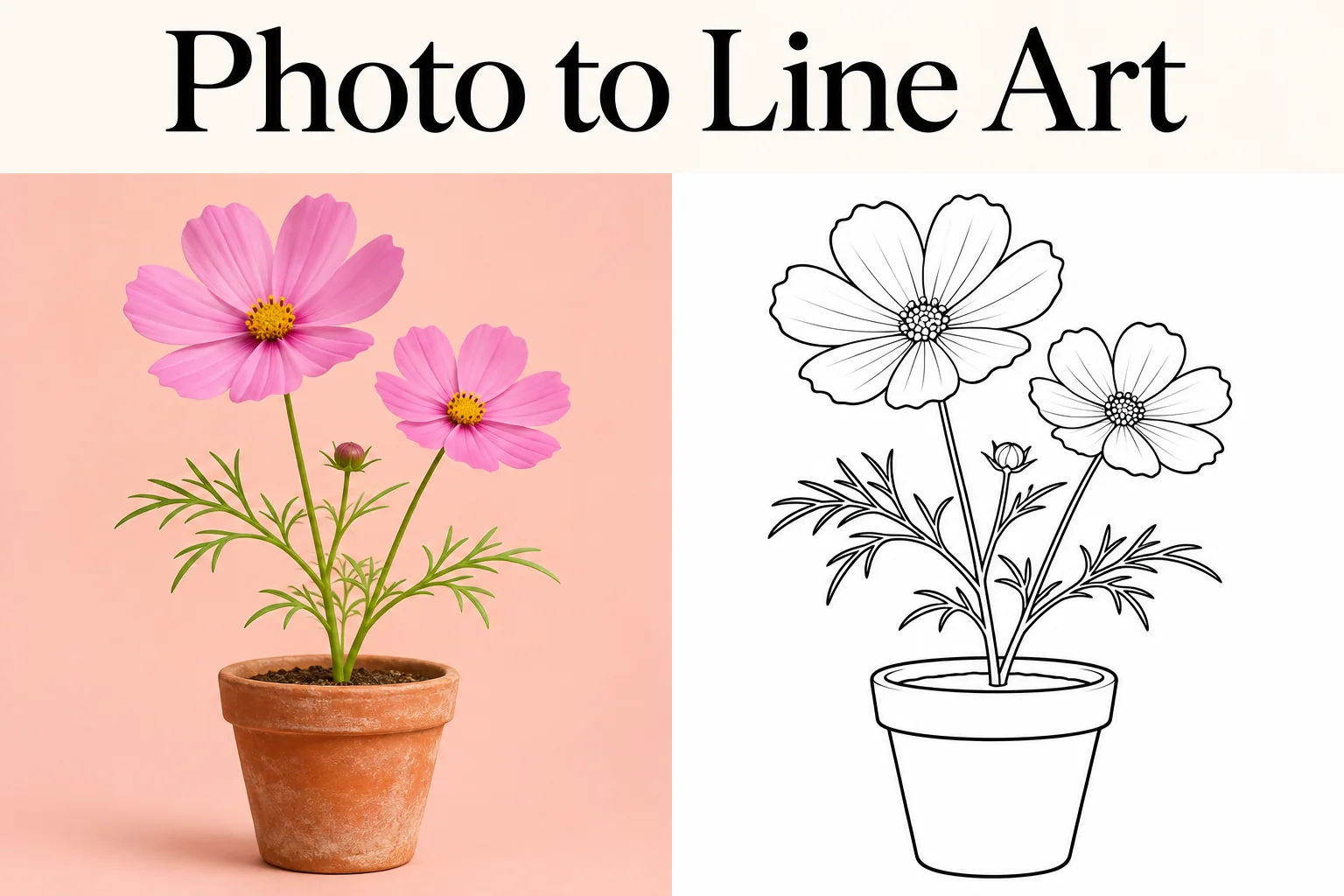
  • Photo to Line Art

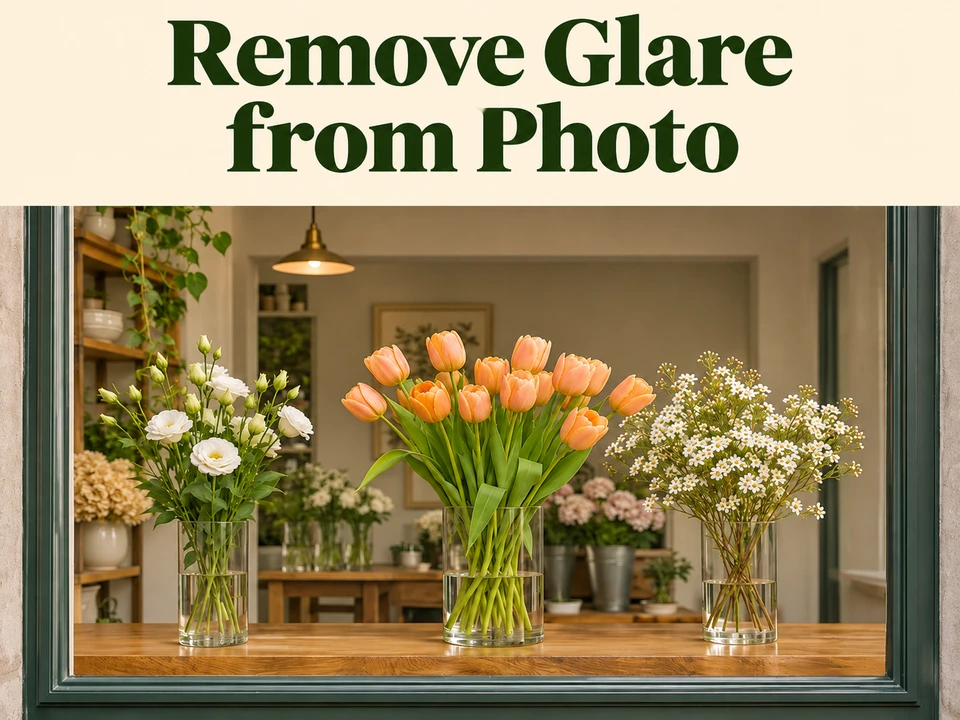
  • Remove Glare from Photo

  • Realistic Selfie Generator

  • Image Upscaler

  • Selfie With Santa

  • AI 3D Figure Generator

  • Motorcycle AI

  • Photo to Sticker

  • AI Photo Booth

  • AI Long Hair Filter

  • Happy Birthday GIF with Name

  • AI GIF Generator

  • Executive Portrait Maker

  • No Beard Filter

  • AI Beard Generator

  • 80s AI Photo Trend

  • AI Pregnant Filter

  • Pet Portrait AI

  • Photo to Watercolor

  • Photo to Coloring Page

Page 1 of 3

Remove Glare from Glasses: Before & After

These comparisons show AI-created portraits and actual Flux 3 Klein results from this tool at Auto/1K, without additional retouching.

Reduce white window glare on glasses

Bright window reflections cross both lenses and partly obscure the eyes. In this test, the edit reduced the window pattern and made the eyes easier to see while retaining the thin frames. Compare pupil position, gaze and frame edges with the original, because hidden eye detail may be reconstructed.
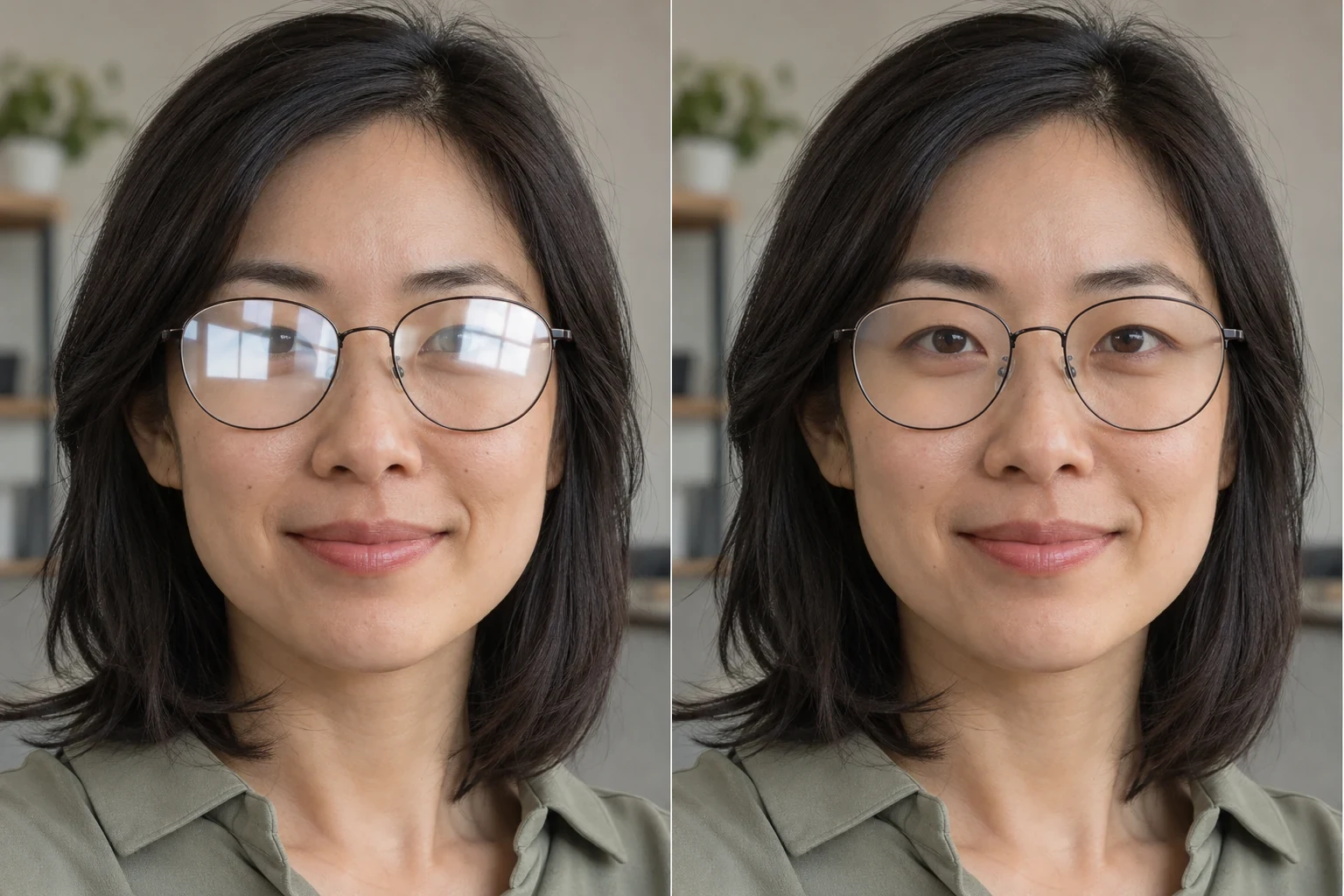
AI-created woman with white window reflections on her glasses beside the actual model resultOriginalAI result
Actual Flux 3 Klein result, Auto/1K. Source portrait created with AI.

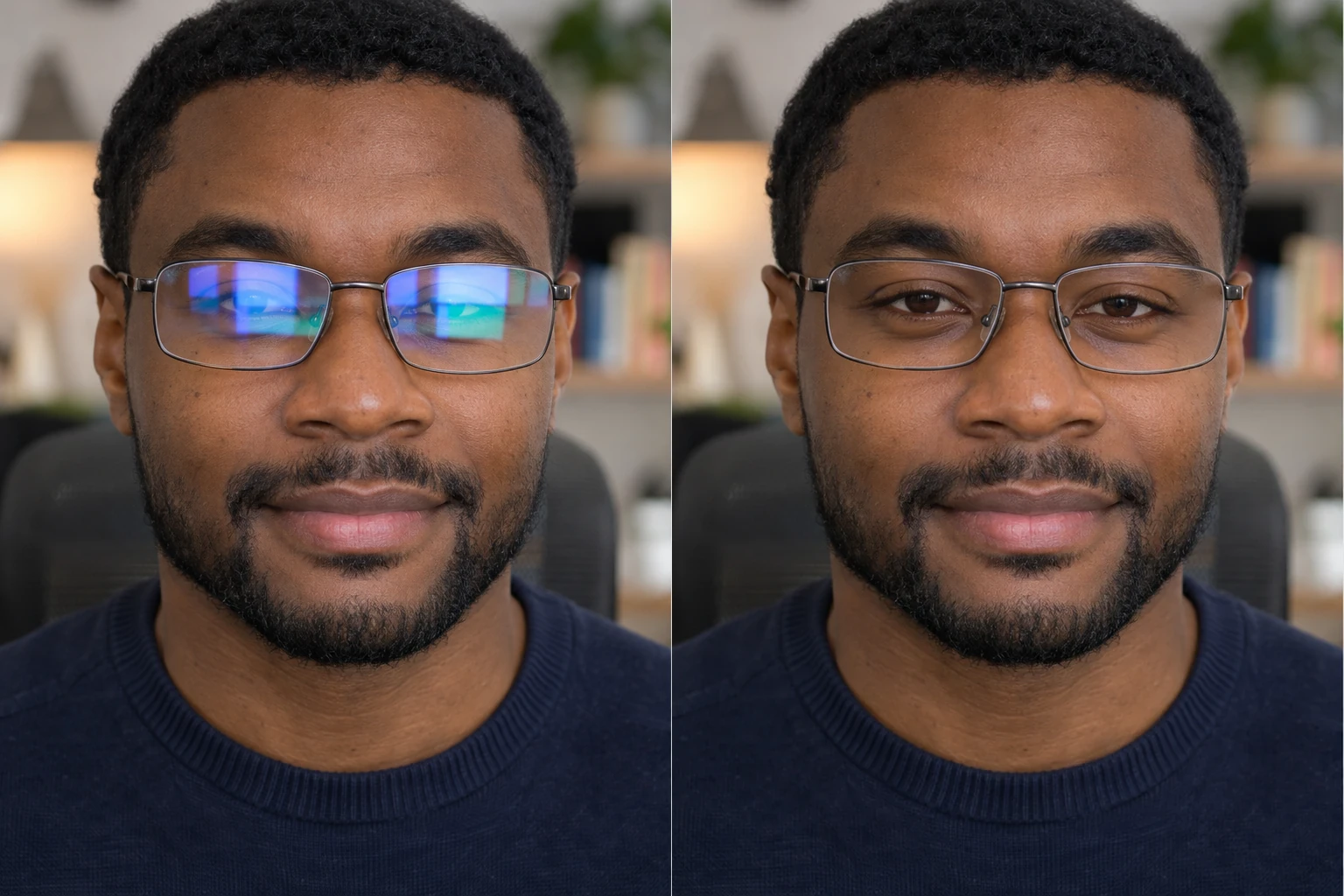
Remove blue and green screen reflections from glasses

Blue and green monitor reflections cover parts of both lenses in this indoor portrait. The edit reduced the colored patches and made the eyes more visible within the rectangular frames. Check iris color, eyelid shape and lens edges against the original, since reflected areas may be reconstructed.

AI-created man with blue-green screen reflections on his glasses beside the actual model resultOriginalAI result
Actual Flux 3 Klein result, Auto/1K. Source portrait created with AI.

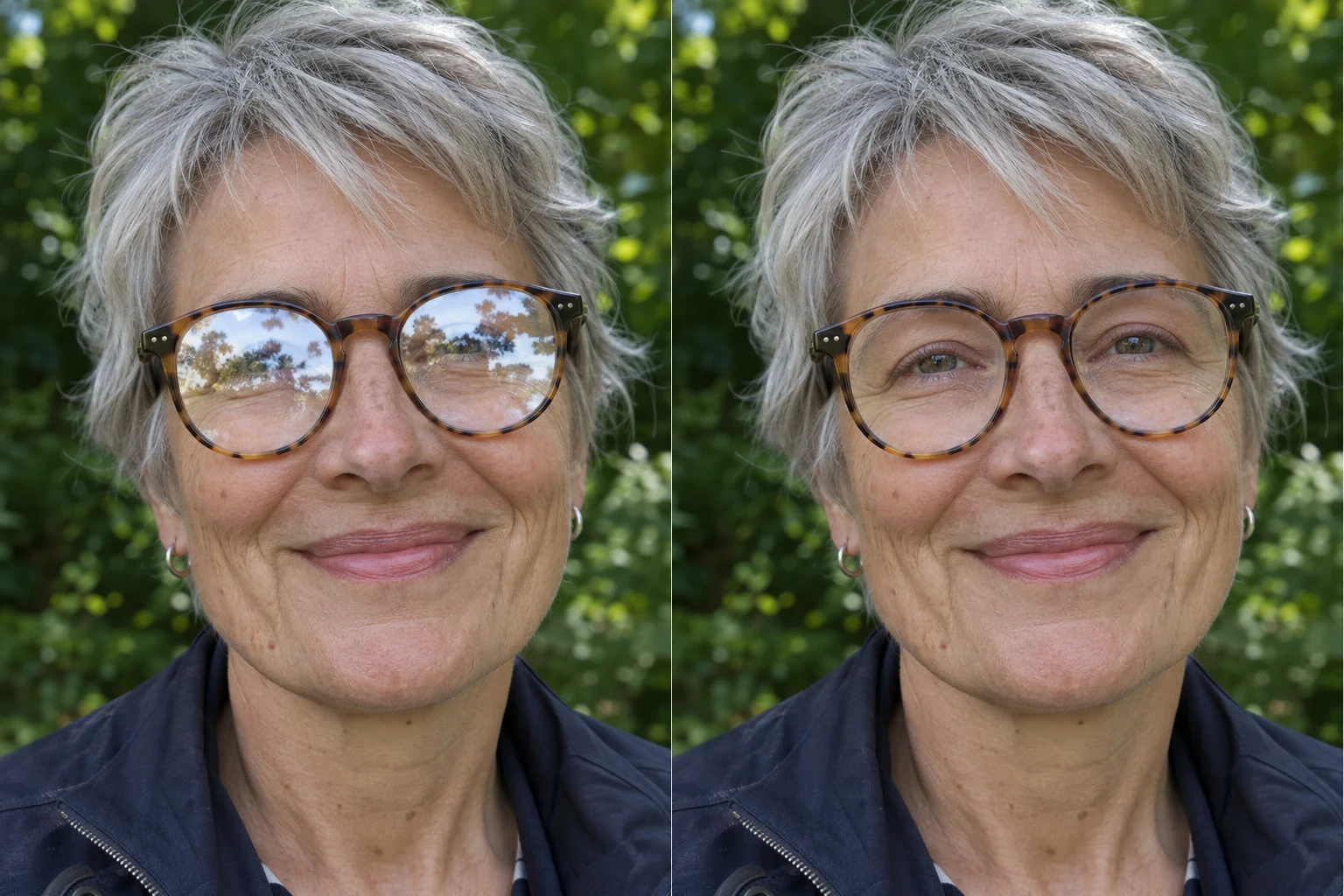
Reduce sky and foliage reflections in an outdoor portrait

Sky and foliage reflections cover much of both lenses in this outdoor portrait. The edit reduced the reflected scene while keeping the tortoiseshell frames visible. Check gaze, eye shape and frame edges; detail hidden by the reflection is reconstructed and may differ from the original.

AI-created woman with outdoor sky and foliage reflections on her glasses beside the actual model resultOriginalAI result
Actual Flux 3 Klein result, Auto/1K. Source portrait created with AI.

Privacy, Pricing & Photo Processing

Your photos are processed through your account, and each generation uses the credit cost shown before submission.

Private account history

Other visitors cannot browse your uploads or results; selected photos are shared with the services needed to process the edit.

Review the cost first

The generator shows the cost for your chosen settings before you submit.

One photo per generation

This tool processes one uploaded photo at a time; batch uploads and batch exports are not currently available.

How to Remove Glare from Glasses in 3 Steps

Upload your portrait, let AI reduce the lens reflections, then review and download the result.

  1. 01

    Upload your photo

    Sign in and upload one JPG, PNG, or WebP portrait with the glasses clearly visible.

  2. 02

    Let AI reduce the glare

    Check the displayed credit cost and run the automatic edit to reduce reflections on the lenses while keeping the glasses in the photo.

  3. 03

    Review and download

    Compare the eyes and frames with the original, then download the result.

AI Image Generators for Your Next Project

Bring your next photo project to life with creative effects, painted portraits, and printable coloring pages.

  • Photo to Line Art

  • Remove Glare from Photo

  • 80s AI Photo Trend

  • AI Pregnant Filter

  • Pet Portrait AI

  • AI Beard Generator

Other Ways to Remove Glare from Glasses

Choose Photoshop, Lightroom, Canva, or iPhone Photos according to the glare's severity and the amount of manual control you need.

Photoshop

Photoshop suits portraits that need precise local retouching and control over the repaired area. It takes manual work, and replacing detail around an eye needs careful comparison with the original.

Lightroom

Lightroom's local tonal adjustments suit mild lens reflections where eye detail is still visible. They can soften brightness and contrast, but cannot recover detail lost in a fully clipped highlight.

Canva

Canva's Magic Eraser can be an option for a small, isolated reflection when you are already editing a portrait there. It is a general erasing tool, so inspect the eye and frame boundary for unintended changes.

iPhone

iPhone Photos is useful for mild glare when the portrait mainly needs a brightness adjustment. Whole-image tonal edits also affect the face and background, and cannot reveal eyes hidden by solid glare.

What AI Can and Can't Fix on Glasses

AI can reduce lens reflections, but it cannot reliably recover exact eye detail hidden by solid glare.

Fully covered eye areas are reconstructed from visible surroundings and learned patterns, so the result may not match the original eyes or gaze.

This tool is designed to keep the glasses, lenses, and frames in the photo; it is not an eyeglasses-removal tool. Generative edits can still change details, so compare the whole portrait before saving.

Small lenses in group photos may be missed. Glare on gradient-tinted or strong prescription lenses may only be partly reduced, and a complete restoration is not guaranteed.

FAQ

Sign in, upload your portrait, run the AI edit, then compare the eyes and frames before downloading. Mild reflections can sometimes be softened with local tonal adjustments; glare that hides eye detail may require reconstruction.

Yes, AI can reduce reflections on glasses when enough surrounding detail remains visible. It uses that context to reconstruct affected lens areas, so fully hidden eye detail may be plausible rather than accurate.

No, this tool is designed to reduce lens glare while keeping the glasses and frames in your photo. It is not a tool for removing an entire pair of eyeglasses.

In Photoshop, use Clone Stamp for small glare patches or try Generative Fill on a selected reflection. Review eye detail and frame edges before saving.

In Lightroom, brush a local mask over the reflection and lower Highlights or Exposure gradually. Stop if the eye loses contrast; fully clipped areas will not regain their original detail through these adjustments.

Yes, you can try this tool with free credits after signing in. Buy a pack or plan if your balance does not cover the displayed cost; downloads are included.

Downloads have no platform-added watermark, and an account is required to upload and generate. Downloading an existing result does not use extra credits.

This tool is intended for clear eyeglass lenses, including thick frames that remain visible in the photo. It does not make sunglasses transparent or remove frames, and dark or gradient lenses may still hide eye detail.

Uploaded photos and results are kept in your private account history and processed by the services needed to generate the edit. Photos are not automatically deleted after 24 hours; unused uploads can be deleted when they are not linked to a generation, and other deletion requests follow the Privacy Policy.

Privacy Policy

Free Credits & Paid Plans

Sign in for free daily credits. Your free allowance is shared across tools and resets each day without rolling over. Choose a plan or credit pack if you need more.

Pay yearly. Get all your credits upfront.

Starter
Save 16%

$12.50/ month

$150.00 billed yearly

Save $28.80 a year vs. monthly

19,200

credits / year

Up to 1,920 images

or 278 short videos

  • Image & video generation
  • All available models
  • Unlock all AI effects & tools
  • No queues. Start instantly.
  • No added platform watermark
  • Commercial use license
  • Private generation
  • Automatic credit refunds on failure
  • All credits upfront
  • Valid for one billing year
  • Cancel renewal anytime
Recommended
Creator
Save 20%

$24.00/ month

$288.00 billed yearly

Save $70.80 a year vs. monthly

87,600

credits / year

Up to 8,760 images

or 1,269 short videos

  • Image & video generation
  • All available models
  • Unlock all AI effects & tools
  • No queues. Start instantly.
  • No added platform watermark
  • Commercial use license
  • Private generation
  • Automatic credit refunds on failure
  • All credits upfront
  • Valid for one billing year
  • Cancel renewal anytime
Pro
Save 40%

$30.00/ month

$360.00 billed yearly

Save $238.80 a year vs. monthly

158,400

credits / year

Up to 15,840 images

or 2,295 short videos

  • Image & video generation
  • All available models
  • Unlock all AI effects & tools
  • No queues. Start instantly.
  • No added platform watermark
  • Commercial use license
  • Private generation
  • Automatic credit refunds on failure
  • All credits upfront
  • Valid for one billing year
  • Cancel renewal anytime

Image example: Flux 3 Klein · 1K. Video example: Grok Imagine Video 1.5 Lite · 5s, 720p.

Each example uses the full balance. Actual counts vary by model and settings.

Prices in USD. Applicable taxes are calculated at checkout.

Compare cost per 1,000 credits
Starter: $7.81Creator: $3.29Pro: $2.27

Glare elsewhere in your photo?

For reflections on windows, photographed prints, or screens, use the separate photo glare tool.

remove glare from photo

Remove lens glare from your glasses photo

Upload a portrait with visible glasses, then compare the eyes and frame edges before keeping the result.

Choose a photo
Image to Image AI logoImage to Image AI

A fresh take on your image. Explore new styles and scenes with AI.

Customer supportsupport@imgtoimageai.com

Tools

  • Remove Glare from Glasses
  • Remove Glare from Photo
  • Photo to Line Art
  • Image Upscaler
  • Realistic Selfie Generator
  • Christmas Photobooth
  • AI 3D Figure Generator
  • Selfie With Santa
  • Christmas Dance Trend
  • Motorcycle AI
  • AI Photo Booth
  • Photo to Sticker
  • QR Code Enhancer
  • AI Long Hair Filter
  • Bicep Heart Trend AI
  • Happy Birthday GIF with Name
  • Apartment Dance
  • AI GIF Generator
  • Executive Portrait Maker
  • AI Trouble Maker Video

Learn more

  • Tools
  • Blog
  • Pricing

Legal

  • Privacy Policy
  • Terms of Service
  • Refund Policy
  • Contact

© 2026 Image to Image AI