Image to Image AI logoImage to Image AI
  • Home
  • AI Image Generator
  • AI Video Generator
  • Tools
  • Nano Banana 2.1
  • Flux 3 Klein
  • Seedream 5.0 Pro
  • Seedream 5.5
  • GPT Image 2.5
  • GPT Image 2.6
  • MiniMax H3 Image
  • Kling 4.0
  • Grok Imagine Video 1.5
  • MiniMax H3 Max
  • Seedance 2.5
More
  • Blog
  • Pricing

Guest

Save your creations

Credits—
  1. Home
  2. /
  3. Image

Pet Portrait AI from Your Favorite Photo

Make the familiar face you love the focus of a painted portrait. Pet portrait AI turns one clear photo into classic pet artwork, with expressive eyes, textured brushwork, and a softly simplified background.

Reference image

Required · 1 image
10
Checking your sign-in status…
Strictly prohibits adult / NSFW content

AI Image Generators to Explore

Try a different look for your photos with generators for portraits, artistic styles, and creative edits.

  • Photo to Line Art

  • Remove Glare from Photo

  • Remove Glare from Glasses

  • Realistic Selfie Generator

  • Image Upscaler

  • Selfie With Santa

  • AI 3D Figure Generator

  • Motorcycle AI

  • Photo to Sticker

  • AI Photo Booth

  • AI Long Hair Filter

  • Happy Birthday GIF with Name

  • AI GIF Generator

  • Executive Portrait Maker

  • No Beard Filter

  • AI Beard Generator

  • 80s AI Photo Trend

  • AI Pregnant Filter

  • Photo to Watercolor

  • Photo to Coloring Page

Page 1 of 3

Small details, unmistakable personalities

A good pet portrait AI image starts with what makes your companion recognizable. Explore these illustrated directions for dogs, cats, smaller animals, and older friends. Each pairs a photographic view with a painted interpretation, so you can consider the expression, framing, and details that matter to you.

A dog portrait with familiar character

The tilt of an ear and the shape of a muzzle can say more than an elaborate setting. With pet portrait AI, a clear dog photo becomes the starting point for an expressive painted study. Keep the features you know well in view: a white blaze, a crooked smile, or a favorite collar.

An eye-level source helps dog portrait AI avoid exaggerated proportions. This pet portrait AI example gives the corgi's alert expression room to stand out.
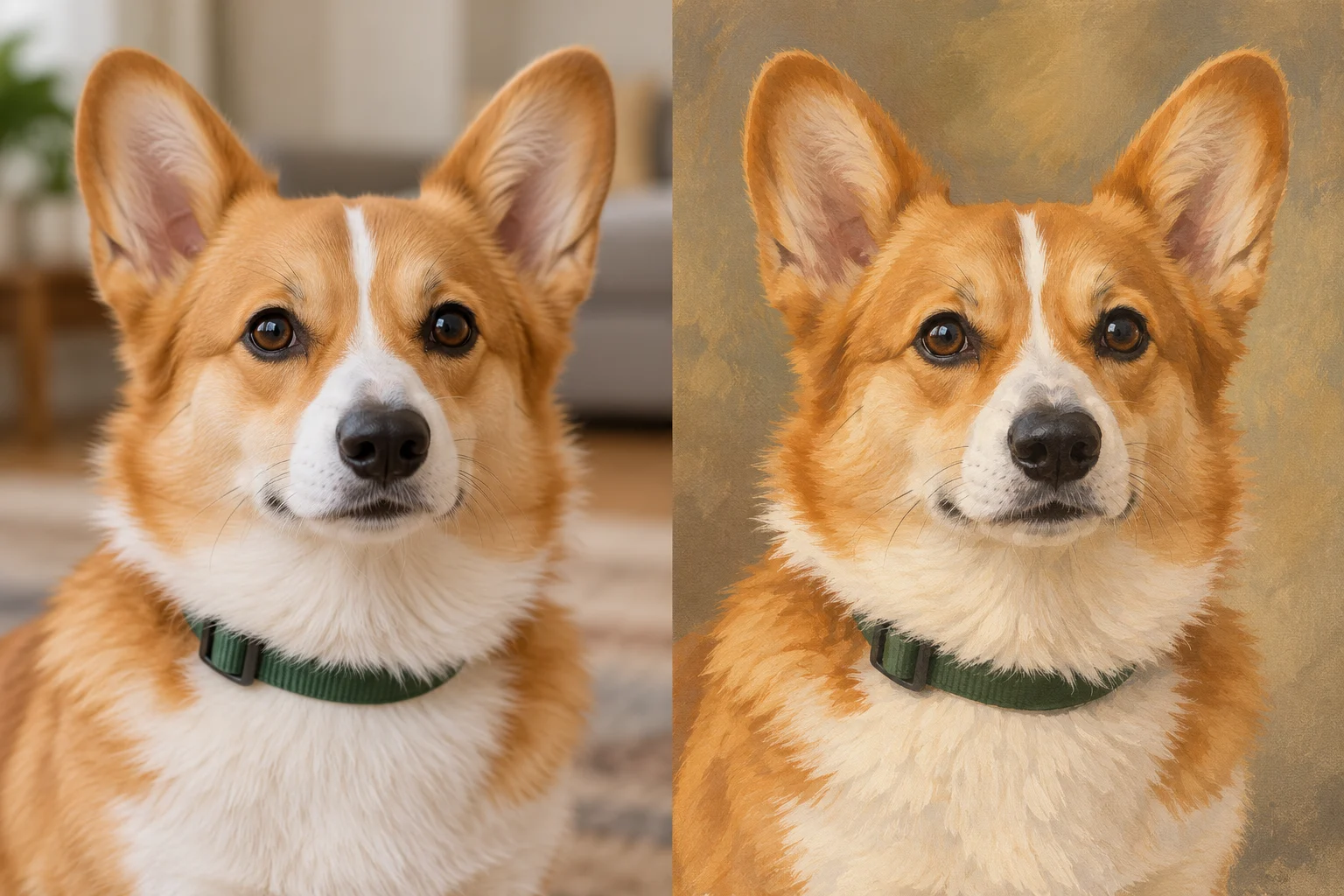
Illustrative corgi photograph beside a classic painted pet portraitPhotoPet portrait

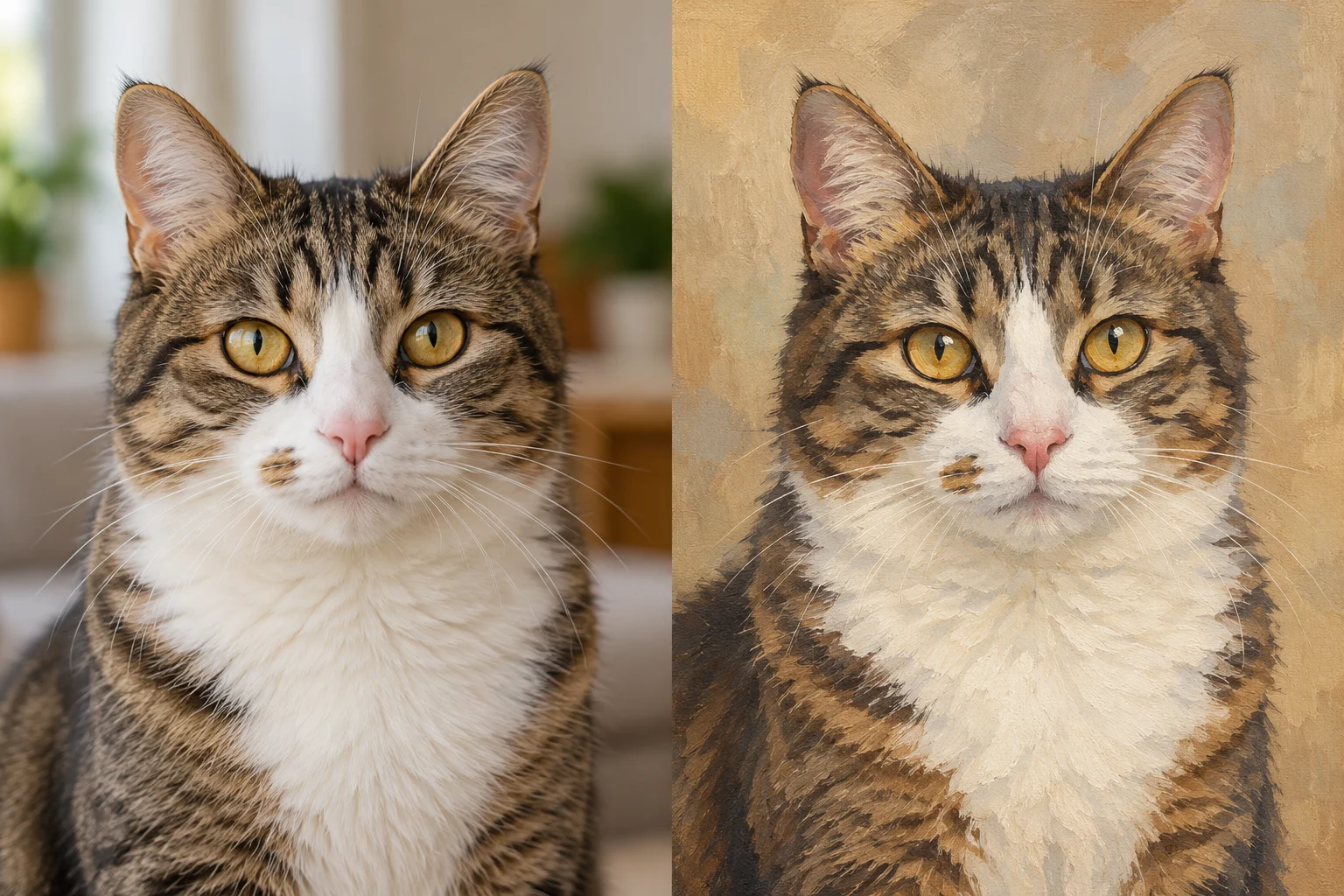
A cat portrait built around the gaze

Cats often have distinctive eyes, whisker pads, and markings that deserve a careful look. Pet portrait AI can reinterpret the photograph as layered paint while using those features as reference. A calm pose with the head turned slightly can feel more personal than a perfectly symmetrical, front-facing composition.

Choose an AI cat portrait source where both eyes are visible. In a pet portrait AI result, compare the stripes around the forehead and the patches beside the nose before deciding which version to save.

Illustrative tabby cat photograph beside a painted portrait preserving its facial markingsPhotoPet portrait

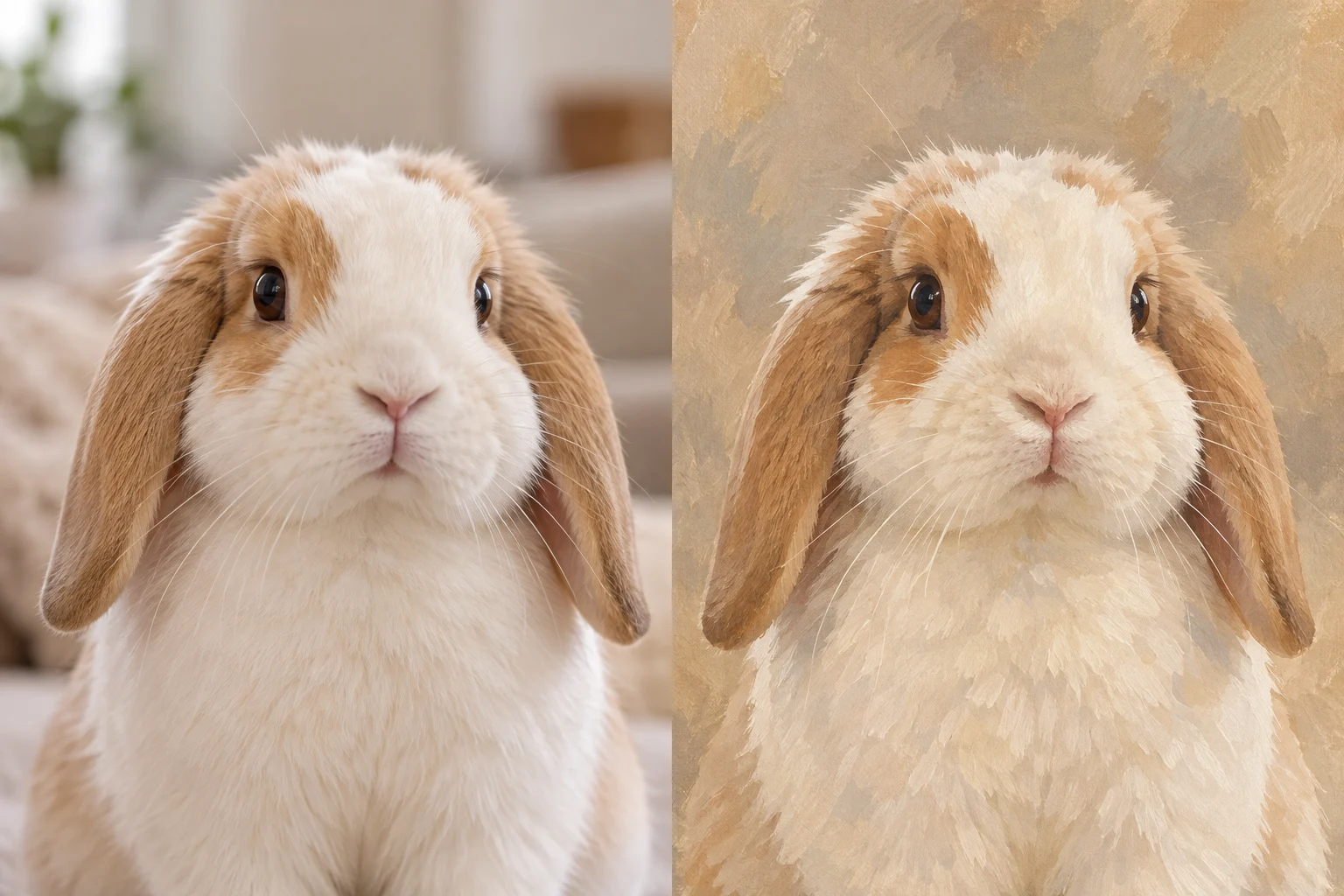
Make space for smaller companions

Pet art is not limited to cats and dogs. A rabbit's long ears, soft nose, and compact silhouette can make a gentle portrait subject. Give pet portrait AI a photo with clear separation between the animal and its surroundings, especially when pale fur blends into blankets or bedding.

Keep ears inside the frame and remove cage bars from the foreground when choosing your photo. Pet portrait AI may reinterpret fine anatomy, so inspect the mouth, ear placement, and any visible paws closely.

Illustrative lop-eared rabbit photograph beside a cream and caramel painted portraitPhotoPet portrait

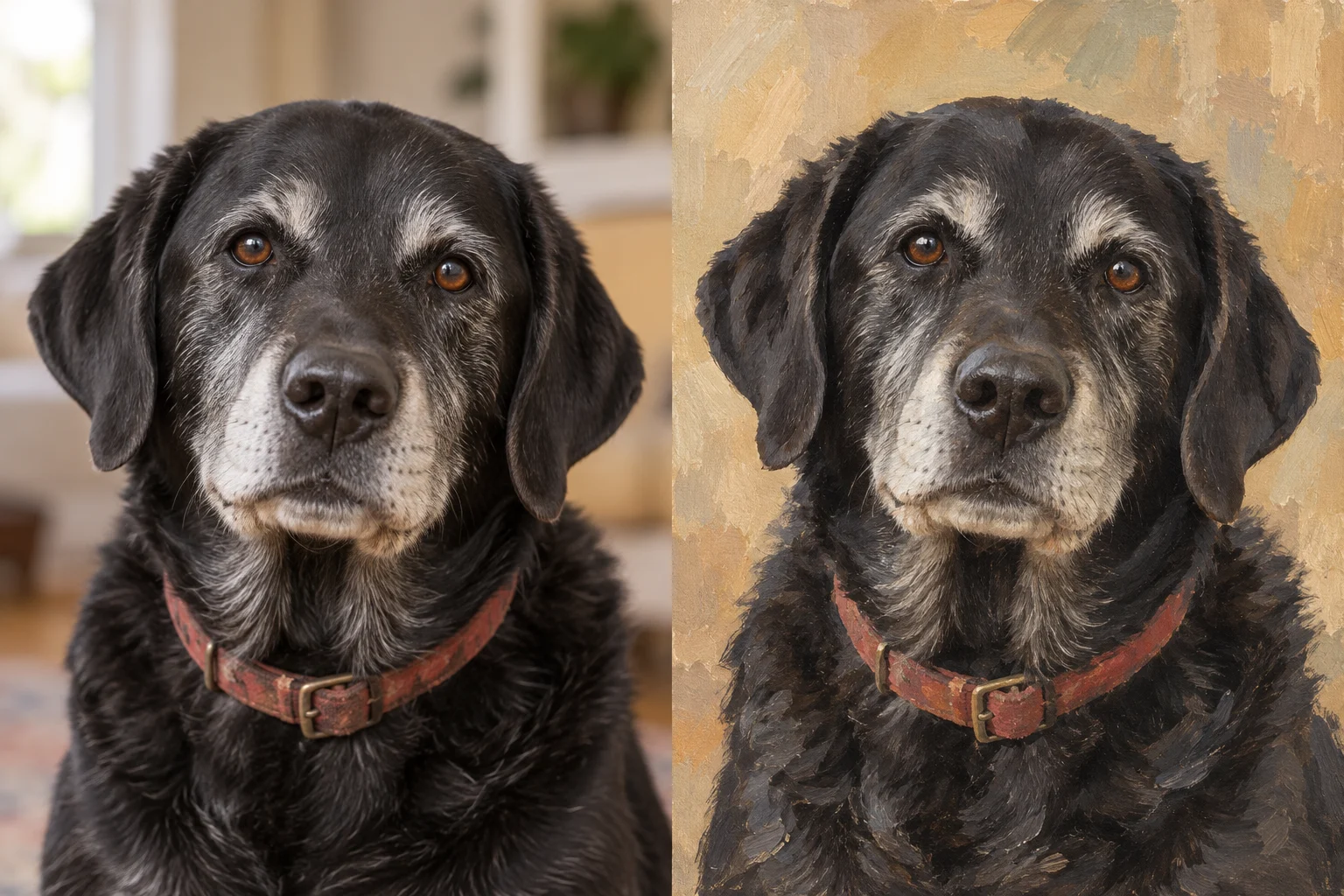
A quiet keepsake of an older friend

Silver whiskers and a familiar resting expression are part of an animal's story. A pet portrait AI keepsake can begin with an everyday photograph rather than a formal sitting. For a pet memorial portrait, choose the moment you want to remember and let the animal remain the center of attention.

This pet portrait AI direction keeps the older dog's grey muzzle and relaxed gaze. Add a name or date later in your layout if you wish; the portrait itself can stay simple and unadorned.

Illustrative senior black labrador photograph beside a painted portrait with a silver muzzlePhotoPet portrait

Create a custom pet portrait from a photo

This AI pet portrait generator uses a prepared painting treatment. You can focus on choosing a photo and its framing without writing an art prompt.

  1. 01

    Upload one clear pet photo

    Sign in, then choose a photo from your device. One animal with a visible face is the easiest starting point. Pet portrait AI takes a single reference image for each request; use the original file when available.

  2. 02

    Choose your portrait shape

    Select an aspect ratio and review the displayed credit estimate. A square works well for a close portrait, while a taller frame leaves room for ears and shoulders. Start pet portrait AI and follow progress in this tool's history.

  3. 03

    Inspect and save your favorite

    Open the finished image and compare it with your source. Check eye color, markings, and body shape before downloading the PNG. Keep a copy of any pet portrait AI version you like before trying another photograph.

AI Image Generators for Your Next Project

Bring your next photo project to life with creative effects, painted portraits, and printable coloring pages.

  • Photo to Line Art

  • Remove Glare from Photo

  • Remove Glare from Glasses

  • 80s AI Photo Trend

  • AI Pregnant Filter

  • AI Beard Generator

What gives pet artwork its character

The classic painted treatment combines defined facial details with quieter surroundings. Pet portrait AI aims for an individual likeness, but generative changes mean you should judge the finished image yourself.

Markings that belong to your pet

A chest patch, a darker ear, or an uneven stripe can distinguish one animal from another of the same breed. Review these details in your pet portrait AI image instead of judging resemblance only by the general coat color.

An expression worth keeping

The eyes and mouth carry much of the mood. A relaxed original supports a gentle portrait, while an alert pose feels more energetic. Pet portrait AI should begin with the expression you actually want, rather than a photo captured mid-blink.

Brushwork around a clear focal point

Opaque color and selective strokes suggest fur without describing every hair. Softer background shapes help the face stand out. This pet portrait AI treatment favors a classic painted finish, with enough texture to feel illustrated at a useful viewing size.

Choose a photo that shows your pet clearly

You do not need professional equipment for pet portrait AI. A steady phone photograph near a window can provide a useful view of the eyes, coat, and outline.

Look for balanced light across the face. Deep shade can hide dark fur, while harsh sunlight can wash out white markings. Before using pet portrait AI, compare a few photos and choose the one that shows the most recognizable features, even if it is not the most dramatic picture.

Leave space around ears, whiskers, and the chest. A tight crop gives the model less context and may make the portrait feel crowded. For pet portrait AI, move toys, bowls, or busy furniture out of the composition by cropping the source, while preserving the animal's natural proportions.

Avoid heavy beauty filters, motion blur, and distant subjects. When turning a pet photo to painting, missing detail has to be interpreted rather than recovered. If the first pet portrait AI image changes an important feature, use a clearer source instead of expecting repeated attempts to restore information that is absent.

Turn a digital portrait into something personal

A pet portrait AI download gives you artwork to use in your own design. Decide where it will live before choosing a final crop.

For an avatar, keep the eyes and muzzle near the center and check how a circular crop affects the ears. A pet portrait AI picture can also become the focal point of a birthday card, an adoption anniversary post, or a small photo album page.

For a gift, arrange the artwork with a short message in your preferred design application. Keep the original PNG and make a separate layout copy. Pet portrait AI does not add editable lettering, so placing names yourself gives you control over spelling, type size, and alignment.

For wall art, check the downloaded pixel dimensions against your intended print size. Preserve the image proportions and try a small proof before ordering a large print. Pet portrait AI supplies a digital image; a printing service, paper choice, and frame are separate decisions.

Pet Portrait AI FAQ

Generation uses account credits. Available free credits can cover eligible requests; check the estimate before submitting. Visiting the page does not mean unlimited free portraits.

This page has one classic painted treatment, without a selector for royal costumes, cartoons, or other painting mediums. It focuses on the animal's natural appearance.

Upload JPEG, PNG, or WebP within the uploader's size limit. Convert HEIC or other unsupported formats first. Accepted files still need to pass normal generation checks.

The tool cannot merge separate photographs. Submit individual animals separately. A group photo may be interpreted differently and is less suitable for precise individual likenesses.

Yes, when saved in a supported format. This tool does not specialize in photo restoration; scratches and missing facial details can influence the artwork.

No. Pet portrait AI varies brushwork and small details between attempts. Save the result you prefer, because another generation cannot guarantee the same picture.

PNG supports transparency, but this treatment creates a painted background, not an automatic cutout. Removing that background requires a separate editing workflow.

No physical order is included. Downloads have no shipping or frame selection. If you want a finished canvas, arrange its production and delivery with a print provider.

Make room for your favorite face

Start pet portrait AI with a photo that feels like your companion. Choose the framing, review the painted details, and save a portrait you will enjoy seeing again.

Create my pet portrait
Image to Image AI logoImage to Image AI

A fresh take on your image. Explore new styles and scenes with AI.

Customer supportsupport@imgtoimageai.com

Tools

  • Remove Glare from Glasses
  • Remove Glare from Photo
  • Photo to Line Art
  • Image Upscaler
  • Realistic Selfie Generator
  • Christmas Photobooth
  • AI 3D Figure Generator
  • Selfie With Santa
  • Christmas Dance Trend
  • Motorcycle AI
  • AI Photo Booth
  • Photo to Sticker
  • QR Code Enhancer
  • AI Long Hair Filter
  • Bicep Heart Trend AI
  • Happy Birthday GIF with Name
  • Apartment Dance
  • AI GIF Generator
  • Executive Portrait Maker
  • AI Trouble Maker Video

Learn more

  • Tools
  • Blog
  • Pricing

Legal

  • Privacy Policy
  • Terms of Service
  • Refund Policy
  • Contact

© 2026 Image to Image AI