


Basketball Middle Finger AI: Turn a Streetball Play Into a Meme
An outrageous dunk, a stunned defender, and a cheeky finish. Create a Basketball Middle Finger AI clip with your own cast and a play the camera can follow.
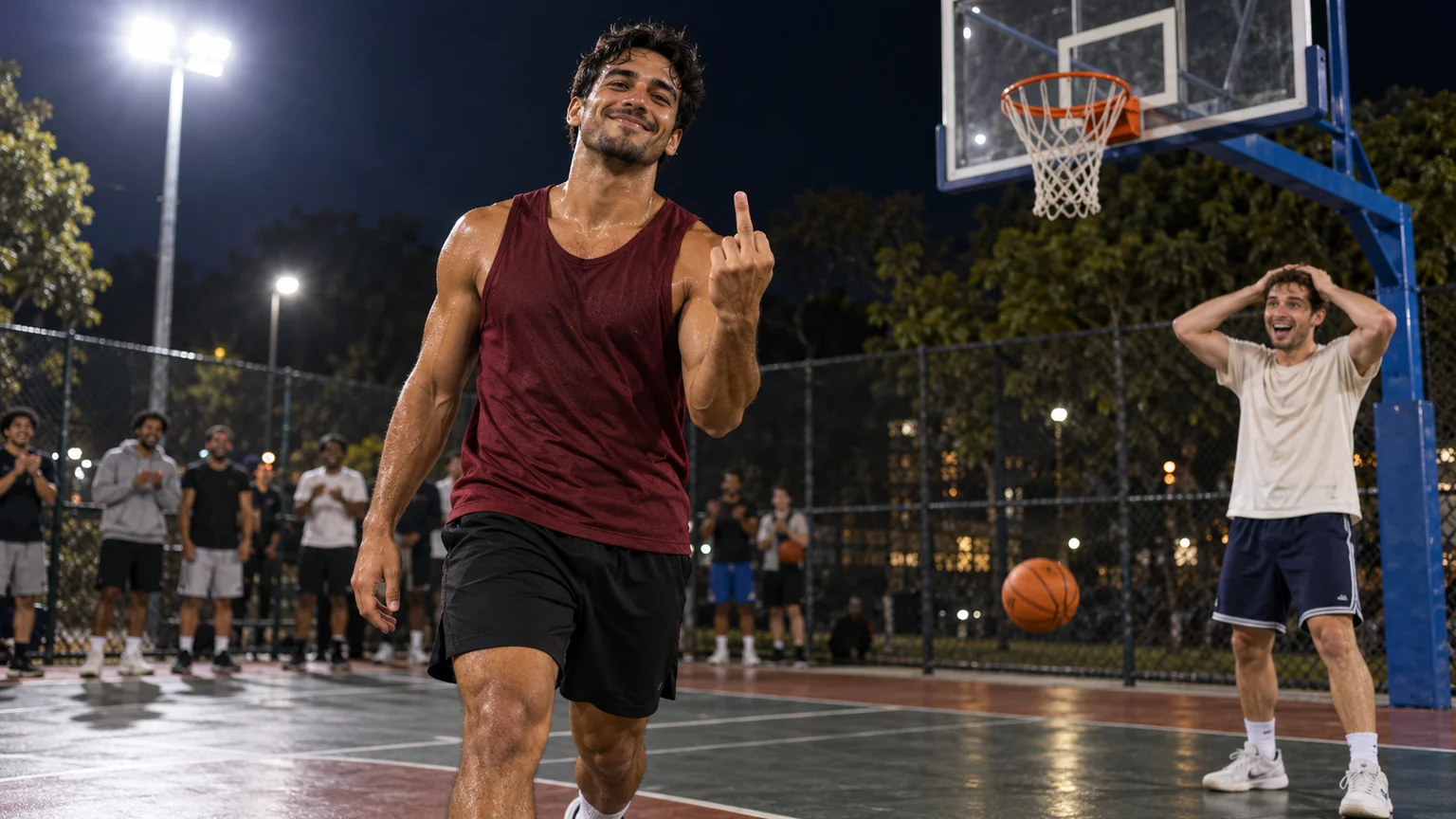
The ball goes through the hoop, the defender cannot believe it, and the scorer looks straight at the camera with an outrageous finishing gesture. Basketball Middle Finger AI turns that streetball fantasy into a short, personalized meme. The casting supplies the joke: an ordinary photo becomes someone having an impossibly confident basketball moment.
On ImgToImage AI, you can prepare the court scene and animate it with written directions. This Basketball Middle Finger AI guide builds the action around a readable approach, one clear dunk, and a deliberate taunt, with practical checks for the ball, the two players, and the hand that delivers the punchline.
What makes Basketball Middle Finger AI recognizable?
The effect combines a one-on-one basketball play with exaggerated confidence. Common versions show a crossover, an enormous leap near or over a defender, a dunk, and a middle-finger gesture toward the camera. Basketball Middle Finger AI belongs to the same creative territory as “my prime 1v1” edits and “dunk on your friend” memes.
The appeal depends on the sequence: the defender creates an obstacle, the basket proves the play, and the gesture supplies the ending. A Basketball Middle Finger AI clip needs that connection more than a packed stadium or elaborate uniforms. A night park court and two recognizable faces are enough to establish the situation.
This workflow generates a new scene from your image and prompt. It is not a fixed basketball template or a frame-by-frame replacement of an existing clip. Expect an interpretation, then select the attempt whose movement and expression tell the story most clearly.
Cast your Basketball Middle Finger AI matchup
Choose a clear standing photo for the attacker. Visible legs, shoes, and shoulders give the image model useful information about proportions and clothing. For Basketball Middle Finger AI, an unobstructed face is especially valuable because the player must remain recognizable during both the approach and the final camera-facing moment.
A second photo lets a consenting friend become the defender. You can also describe a fictional opponent when preparing the scene. Give your Basketball Middle Finger AI cast visibly different clothing, such as burgundy for the attacker and cream for the defender, so their roles remain easy to follow during overlapping movement.
Pick photos taken from similar camera heights. A close selfie paired with a distant full-body shot can produce mismatched head sizes. Before making a Basketball Middle Finger AI scene, crop away unrelated people and decide whose appearance belongs to each role; the upload order should match your written casting instructions.
Put the basket inside the action
Open the AI Image Generator and choose an available model that accepts your references. A useful Basketball Middle Finger AI starting image places the attacker near the lane, with the defender slightly off the route to the basket. Keep the rim, net, both bodies, and floor visible together.
Start with a three-quarter courtside view. It can show the scorer's face while revealing whether the ball enters the hoop. For a portrait Basketball Middle Finger AI edit, leave extra space above the rim and below the shoes; a tight crop has nowhere to accommodate the jump.
Use this scene prompt, replacing the clothing descriptions as needed:
Prepare a Basketball Middle Finger AI starting scene using my photos as the appearance references. The first adult is the attacker in a burgundy sleeveless jersey and black shorts, holding one orange basketball at the right hip. The second adult is the defender in a cream T-shirt and navy shorts, standing a step to the side. Show both full bodies on a floodlit outdoor court at night, close to one hoop with a transparent backboard, orange rim, white net, and blue support. Keep a clear path to the basket. Use a three-quarter courtside view, visible faces, natural proportions, and soft background spectators. No duplicate balls, extra players in the lane, logos, or lettering.
Check the still before animating. A Basketball Middle Finger AI setup with a floating rim, missing net, or ball fused to the hip already has a continuity problem. Repair that image now rather than asking the motion prompt to invent a different court halfway through.
Plan Basketball Middle Finger AI in three beats
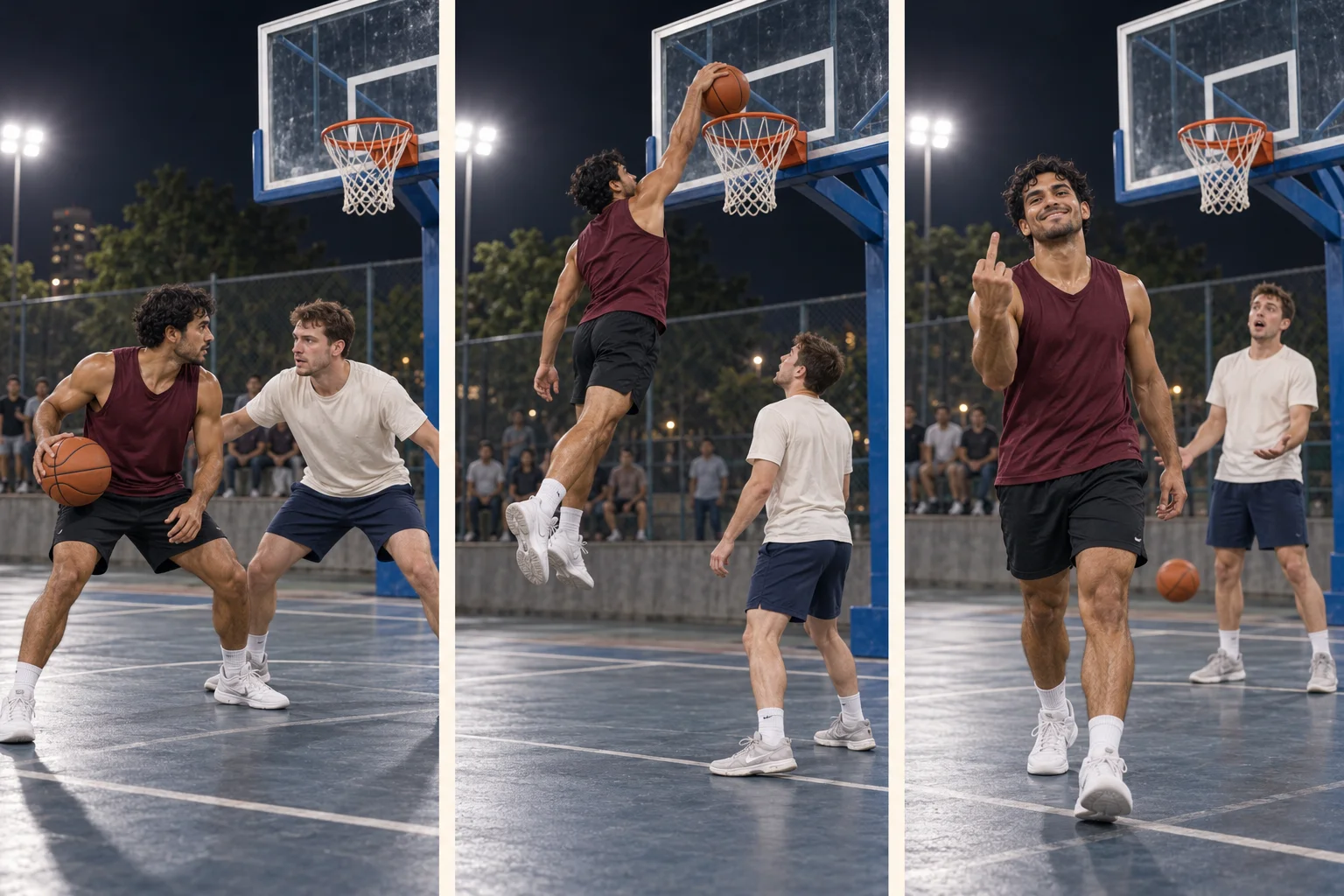
First, establish the attacker moving toward the basket. One dribble or a short gather is enough for an initial Basketball Middle Finger AI attempt. A long crossover exchange consumes time without improving the punchline, especially when the video also needs a jump, landing, and reaction.
Next, make the scoring action legible. For Basketball Middle Finger AI, begin with a dunk beside the defender before attempting a leap directly over them. The more ambitious version adds body overlap and obscured faces; test it by changing only the jump path once the simpler play works.
Finally, separate the gesture from the difficult ball contact. Some Basketball Middle Finger AI versions combine the taunt with the airborne dunk. Moving it just after landing gives the model a steadier face and free hand, while preserving the provocative finish that identifies the meme.
Generate the play on ImgToImage AI
Enter the video workspace, sign in, and choose Seedance 2.0 Mini. Upload your prepared Basketball Middle Finger AI scene to Start frame. Leave End frame and Reference images empty for this workflow; the reference-image mode is separate from frame inputs.
Try twelve seconds at 720p to give the three actions room to unfold. The available controls support 4–15 seconds, 480p or 720p, and common portrait and landscape ratios. Match your Basketball Middle Finger AI output ratio to the composition, using a JPEG, PNG, or WebP file up to 10 MB.
Read the displayed credit estimate before submitting. Generate one Basketball Middle Finger AI take, inspect it, and decide what to change before ordering another. The estimate and task status are more useful than assuming a fixed price or completion time from another tool.
Copy a Basketball Middle Finger AI motion prompt
Animate this Basketball Middle Finger AI scene as a continuous twelve-second streetball clip. Keep the burgundy-shirted attacker and cream-shirted defender distinct. The attacker takes one short dribble, gathers the single orange ball in the right hand, and makes a powerful jump beside the defender. The right hand carries the ball above the orange rim and pushes it down through the net. The defender steps aside and watches without contact. The scorer lands, turns toward the camera, and raises the empty left hand at chest height, extending the middle finger while curling the other fingers. Hold a cheeky expression briefly. The defender reacts with hands on head. Keep the complete basket and both players visible from the same courtside angle. Preserve their faces and clothes. No cuts, extra balls, body collisions, or changing hoops. Use ball bounces, shoes, rim contact, and crowd ambience without music.
Treat this Basketball Middle Finger AI prompt as direction, not a guarantee of exact timing or finger anatomy. Open the completed clip in video history and watch the entire play once before pausing on details. A technically clean gesture cannot rescue a basket that never happens.
Review Basketball Middle Finger AI from ball to hand
Follow the ball first. It should remain a single object through the gather, travel above the rim, and leave below the net. If your Basketball Middle Finger AI result duplicates it or throws it through the backboard, shorten the approach and remove extra dribbles before adjusting anything else.
Then inspect the jump and landing. Feet should leave the court before the body rises and return after the scoring action. In Basketball Middle Finger AI, a defender merging into the attacker's legs usually calls for more separation in the starting image or a less ambitious flight path.
Check the hand during the finishing hold. The middle finger must be distinct from the folded fingers, and the empty hand must stay separate from the ball. A Basketball Middle Finger AI attempt with a distorted sign may improve when you lower the hand, reduce wrist rotation, or move it farther from the face.
Finish by checking identity and attention. Pause at the opening, near the rim, and after landing. A good Basketball Middle Finger AI revision addresses the weakest moment: shorten a face-obscuring turn, keep the defender's reaction smaller, or reduce crowd motion if spectators distract from the scorer.
Cut the sound to the basket
Listen for the bounce, rim impact, and crowd reaction. Those cues help Basketball Middle Finger AI feel like one connected event. If generated sound puts the rim hit before the dunk, lower that track and align a suitable sound effect with the visible contact in an editor.
Add music only from a source available for your intended use. Keep the Basketball Middle Finger AI opening short, but leave enough setup to identify the defender. Hold the ending long enough to read the expression, then cut before wandering hands or extra movement weaken the joke.
For sharing, keep captions clear of the rim and the raised hand. A short line such as “My prime lasted twelve seconds” adds context without explaining every frame. Label your Basketball Middle Finger AI post as an AI recreation, and let the people you cast see the finished joke before sharing it widely.
Basketball Middle Finger AI questions
Can I make it from just one photo?
Yes. Use your portrait for the attacker and describe a fictional defender while composing the court. The Basketball Middle Finger AI workflow still needs a two-player starting image; the second person simply comes from the scene description rather than another uploaded portrait.
Can the finish use a different gesture?
Replace the raised finger with a shoulder brush, shrug, or smile in the motion prompt. That changes the tone of Basketball Middle Finger AI while retaining the dunk-and-reaction structure. Choose the ending that fits the audience and the relationship between the two people.
What if I prefer a simpler sports effect?
The Enzo celebration guide focuses on a standing pose without ball-to-rim contact. It is a useful alternative when your photo is a close portrait or when the appeal is an expression rather than a complex athletic sequence.
Create your Basketball Middle Finger AI video in the AI Video Generator. Start with a clearly staged matchup, make the basket easy to follow, and save the boldest attitude for the final camera-facing moment.
Keep exploring
 Video Guides
A low camera, an absurd stack of cash, and a perfectly serious face. Break down a real Money Flex AI example and plan your own version with practical prompts.
 Video Guides
Step through the gate and make the path your stage. Create a Fergie Baby AI walk from your photo, with a confident stride, expressive gestures, and a camera that keeps pace.
 Video Guides
The party keeps moving, but you stop to stare. Make a Bby Wow Guy AI scene with your photo, a concha, and the awkward pause that makes the joke land.
 Video Guides
Crouch on thin air, glance at the pursuer, and make your getaway. Create a Crazy Frog AI video with a clear riding pose, a moving road, and your own face.