


Smalltown Boy Dance AI: Turn Photos into a Playful Duo Video
Create a Smalltown Boy Dance AI video with your own duo. Plan the reaction, role switch, and dance, then generate short clips on ImgToImage AI.
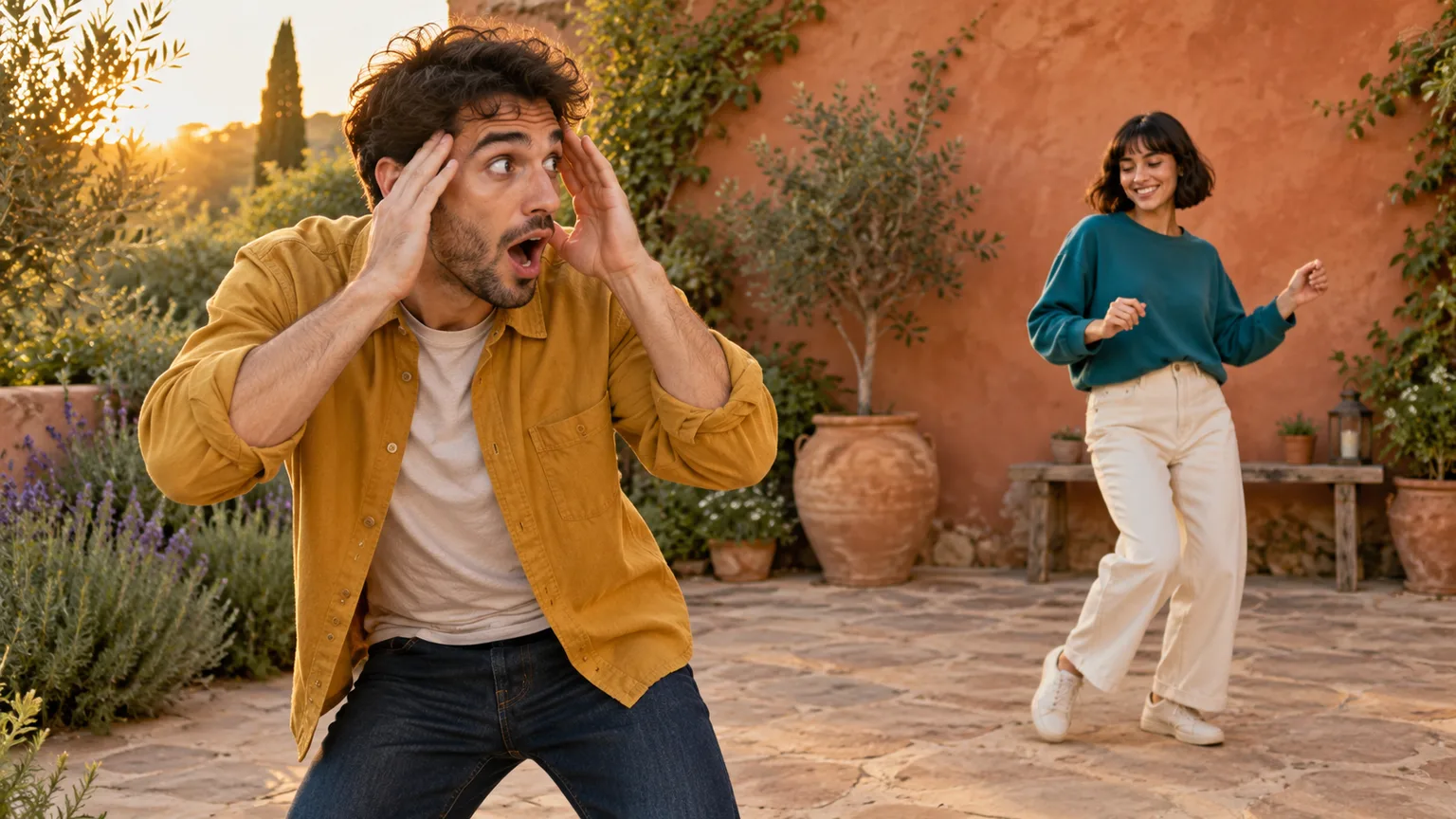
One person reacts as though everything has gone wrong. Behind them, their partner keeps dancing. Then the roles reverse, and the pair finish together. That contrast is the appeal of Smalltown Boy Dance AI: familiar faces become the cast of a theatrical little dance joke.
To make your own version on ImgToImage AI, prepare a scene containing both performers, open the AI Video Generator, and animate one moment at a time. Download the short clips, assemble them in your usual editor, and add suitable music before sharing. You can start with friends, fictional characters, or a deliberately stylized pet duo.
This guide walks through the photo setup, three suggested motion prompts, and the details to check before another attempt. The illustrations show the concept and staging; they are not examples of tested video outputs.
What makes a Smalltown Boy Dance AI video recognizable?
The dance format pairs an exaggerated foreground reaction with a relaxed dancer behind it, commonly set to Bronski Beat's “Smalltown Boy.” The performers exchange attention before dancing together. Some interpretations add a close approach to the camera, but the contrast between the two roles carries the idea.
That structure matters more than a particular outfit or background. A person holding their head while their friend dances communicates two different moods at once. Switching their positions completes the joke: the carefree partner suddenly becomes the dramatic one.
For your own Smalltown Boy Dance AI edit, decide what the duo represents. Try “me checking the bill” and “my friend ordering dessert,” or two characters reacting differently to Monday morning. One concise setup gives viewers a reason to watch the exchange.
On ImgToImage AI, you direct a custom interpretation with images and prompts. The workspace is a general video generator, so plan the sequence yourself rather than expect a preloaded routine with fixed choreography.
Prepare one clear scene for two performers
Begin with a photo of two consenting adults or an original image of your chosen characters. If your subjects come from separate portraits, prepare a single scene containing both before moving to video. The AI Image Generator can help you develop that starting composition; inspect the result before animating it.
Give each performer an obvious visual identity. A mustard shirt and a teal sweater are easier to describe than two similar dark outfits. For pets, distinct coat patterns help you track which animal stays in each role. Avoid a busy crowd or extra faces in the background.
Arrange the first performer closer to the camera and the second farther back, slightly to one side. Both faces should remain visible. Leave room around the front subject's head for raised hands, and show enough of the rear subject's body for the dance to read.
Prepare three starting images if you want the full sequence: the opening arrangement, the reversed arrangement, and a wider view with both subjects side by side. Keep their clothing, lighting, and surroundings consistent. This gives each clip a clear starting state without asking the video model to invent every transition.
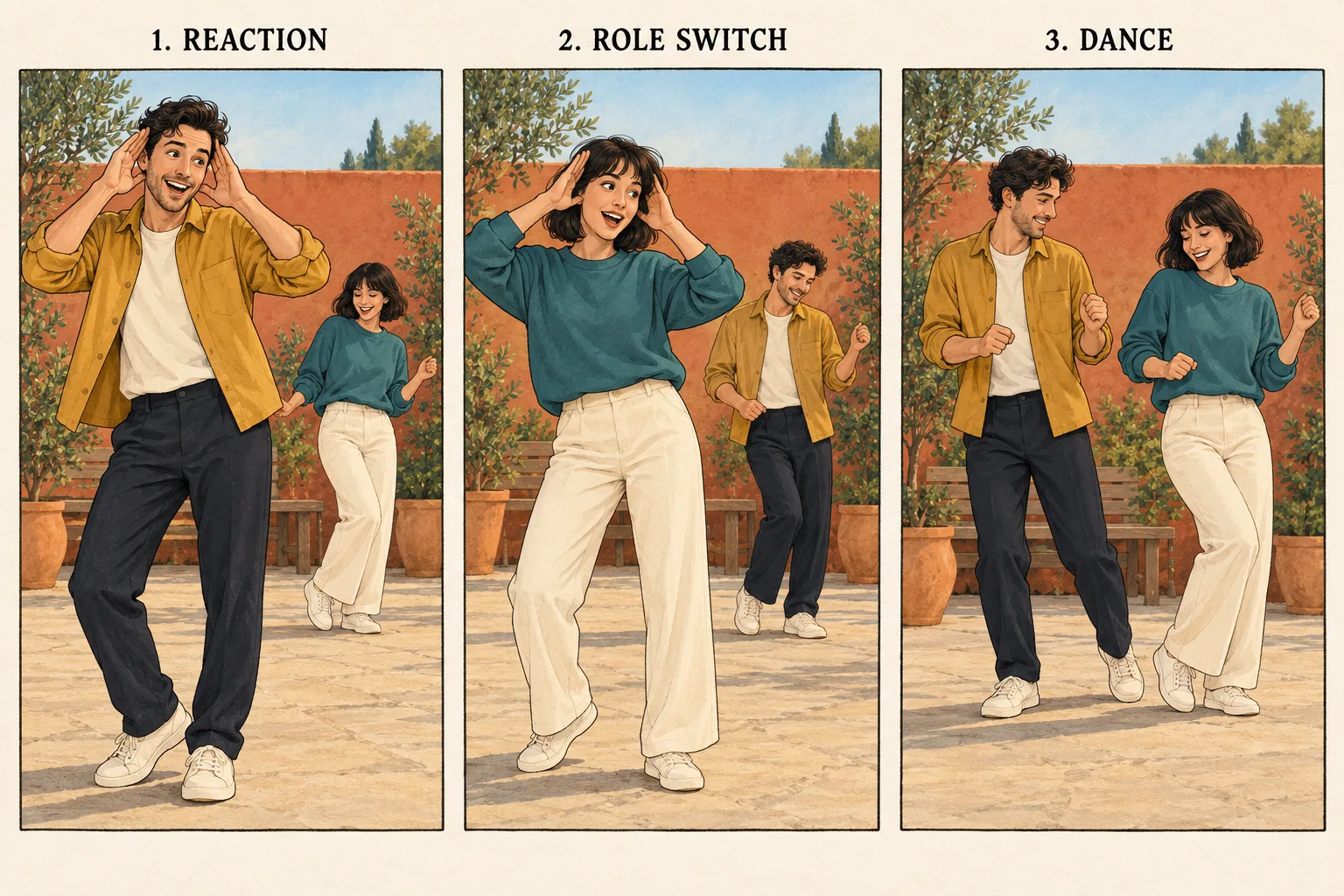
Make your Smalltown Boy Dance AI clips on ImgToImage AI
1. Open the video workspace
Visit the video workspace, sign in, and select Seedance 2.0 Mini from the model menu. Use its start-frame workflow for each shot in this guide. Check the displayed controls before choosing settings, and keep the same model across the sequence to make comparisons easier.
2. Upload the opening scene
Upload the prepared image with both performers visible to Start frame. Seedance 2.0 Mini accepts JPEG, PNG, or WebP up to 10 MB per image. Leave End frame and Reference images empty for this workflow. Its separate multi-reference mode does not turn two portraits into dedicated casting slots.
3. Set a short duration and check credits
Start with four or five seconds for one reaction. Seedance 2.0 Mini allows 4–15 seconds and 480p or 720p output. Choose 9:16 for a vertical edit, 16:9 for landscape, or Auto to adapt to the input. Compose the starting image for your chosen format so both performers stay visible.
Check the estimate before generating. Model, resolution, and duration affect cost. Reserve room in your budget for the other two shots and a possible correction instead of spending everything on the opening.
4. Generate, review, and continue
Use the opening prompt below and follow the request in your video history. Play the whole result before downloading it. Once that shot works, generate the reversed reaction and shared dance separately. Your Smalltown Boy Dance AI sequence becomes easier to control when each request has one clear job.
Three Smalltown Boy Dance AI prompts to adapt
Replace the clothing descriptions with details from your own images. These prompts are starting suggestions, not tested presets. Pair each one with the matching reference scene, and keep the visual style consistent across all three.
Shot one: the dramatic reaction
Animate the two adults in the reference image. The person in the mustard shirt stays in the foreground and raises both hands beside their temples with a playful, open-mouthed expression of surprise. The person in the teal sweater stays behind them and makes a small, relaxed side step. Preserve both faces, outfits, and positions. Keep the camera still, with natural movement and no cuts.
The foreground reaction should remain readable without covering the eyes. If the background dancer distracts from it, reduce their movement to a gentle sway.
Shot two: reverse the roles
Animate the reversed arrangement in the reference image. The person in the teal sweater is now in front, making an exaggerated comic reaction with hands beside their head. The person in the mustard shirt stays behind and sways casually. Keep each face and outfit attached to the correct person. Preserve the setting and lighting, with a fixed camera and no crossing paths.
Cut between the first and second shots in your editor. Preparing the reversed composition avoids relying on a complicated physical position swap within one generated clip.
Shot three: dance together
Animate the same two adults standing side by side in the reference image. They smile and perform a simple step to one side, then back, with gentle shoulder movement and relaxed arms. Keep their full bodies visible, their feet connected to the ground, and their appearances consistent. Use a steady camera, an unchanged background, and one continuous shot.
Get the duet working before adding a rush toward the lens. A camera approach changes face scale quickly and makes inconsistencies easier to notice.
Fix identity and movement before adding effects
Review your Smalltown Boy Dance AI clips as a connected sequence. Compare the same person's face, hair, and clothing at the beginning and end of every shot. A convincing opening does not guarantee that the character remains recognizable throughout.
| What looks wrong | A useful next adjustment |
|---|---|
| The performers exchange faces or clothes | Use distinct outfits and specify each person's position and action. |
| Hands merge with the forehead | Keep hands beside the temples and reduce the speed of the gesture. |
| The background dancer disappears | Move them farther to the side in the starting image. |
| Feet slide across the ground | Shorten the step and keep the camera fixed. |
| The setting changes between shots | Prepare matching references before generating the next clip. |
Change one thing per retry. If the identity is stable but the dance is too large, adjust the movement without also replacing the background. For an idea that remains unreliable, simplify the scene before increasing resolution.
Add the music and finish the timing
The soundtrack gives the edit its musical context, but generating a visual clip does not supply the original recording. ImgToImage AI has no music generator or editing timeline in this workspace. Download your clips and assemble them in a separate video editor.
Place the first reaction, the reversed reaction, and the shared dance in order. Trim any waiting time before the gestures. Then choose audio available for your intended use and align a noticeable musical moment with the role change. Listen and watch together; a prompt mentioning the song does not establish exact beat synchronization.
When preparing a Smalltown Boy Dance AI post for TikTok, YouTube Shorts, or another feed, preview it at phone size. Keep captions away from faces and raised hands. If you add music through the destination app, check what is available to your account and intended use. Keep a clean version without music for other destinations, including X.
Questions before your first generation
Can I use two cats or dogs?
You can try a stylized pet interpretation with a reference showing both animals. Describe each animal by its coat and position. Upright dancing asks for imaginative anatomy, so expect experimentation and inspect paws, legs, and faces closely. A simpler sway may communicate the joke better than elaborate footwork.
Is it free to make?
Check your account balance and the displayed generation estimate. Any available free credits must cover the chosen request; several shots and retries may require more. Set a budget for the complete edit before starting.
Will it match an existing dance exactly?
Image-to-video interprets your written instructions and starting image. It does not guarantee the choreography, expressions, or timing of another clip. Focus on the recognizable contrast between reaction and dance while giving the scene your own characters and context.
How should I share it?
Use photos you have permission to animate and label the result as AI-generated. A playful caption can explain the situation without suggesting that the people actually performed or recorded it.
Start with your opening reaction
Choose your duo, prepare a clear starting scene, and open the AI Video Generator. Generate one short reaction before committing to the whole sequence. A memorable Smalltown Boy Dance AI video starts with two readable characters and a well-timed exchange; the finishing touches can follow once those pieces work.
Keep exploring
 Video Guides
Invite two friendly ghosts onto your dance floor. Build a Halloween Dance AI video from a photo, or try a playful vampire performance on the porch.
 Video Guides
A tiny dance captain, a barn full of parrots, and one very confident routine. Make a Parrot Dance AI video with your own bird, cat, or dog.
 Video Guides
Turn a photo of you and a friend into an electro dance concept. Learn the Transmission 5 Dance AI look, plan the moves, and create a personal video.
 Video Guides
Open arms, a shoulder bounce, and a knowing look between friends. Create a Puerto Rican Mami Dance AI video with clear gestures and your own personality.