


Burger Thru Window: Make Your Own AI Window Meme
Turn a quiet midnight snack into an awkward window encounter. Create a Burger Thru Window AI video with a clear reference image, a slow approach, and a deadpan stare.
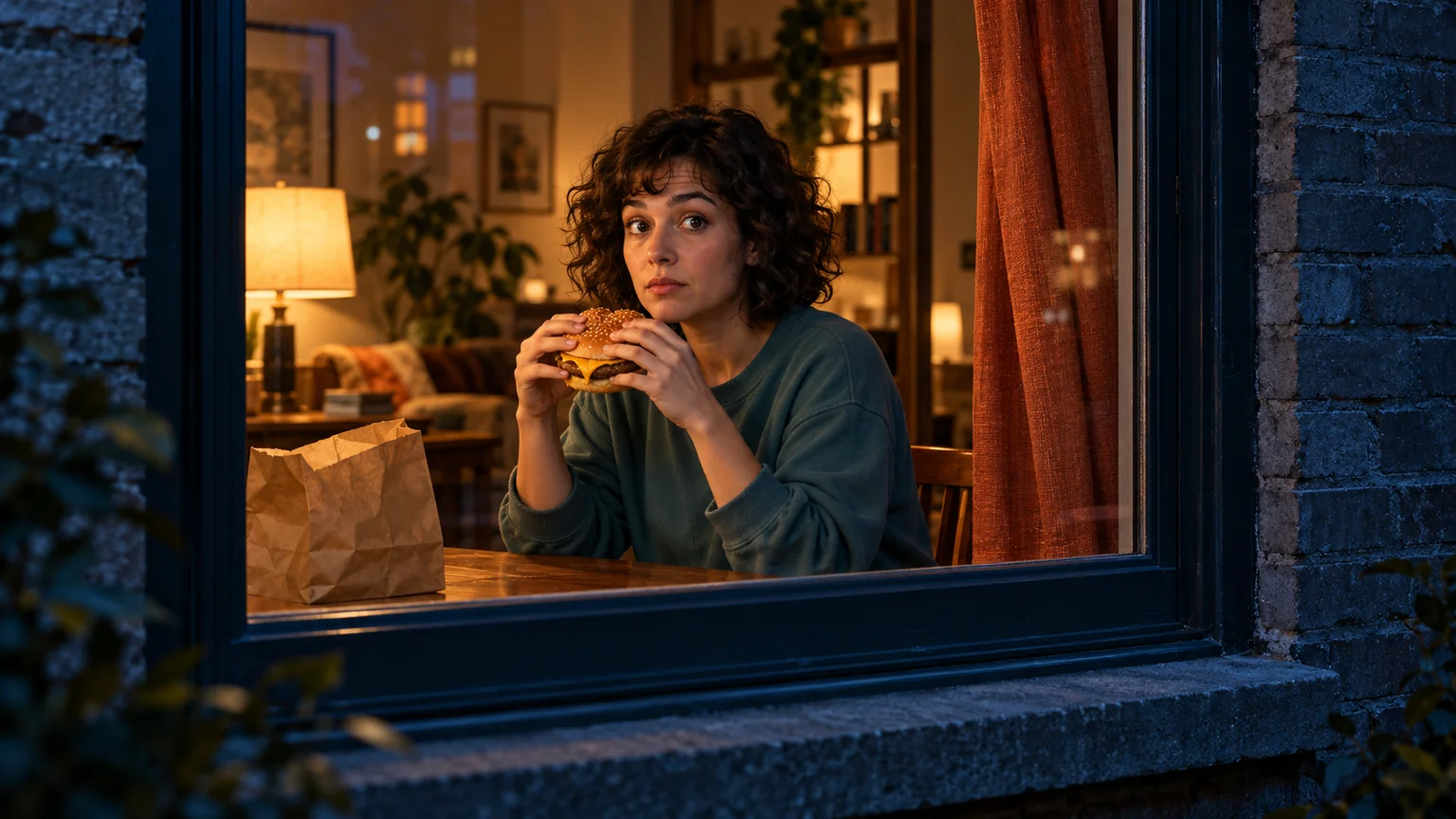
A quiet meal becomes a tiny comedy when the person eating realizes someone is watching. Burger Thru Window builds that moment around a dark apartment exterior, a warm window, a burger, and a stare that lasts slightly longer than expected. The curtain provides the final punctuation.
For a one-photo workflow, open the Burger Thru Window AI Video Generator. Choose a clear portrait, select the output settings, and create your own window-and-burger reaction. The demonstration clip is for illustration; your result may differ in appearance, movement, and sound.
You can also create your own interpretation on ImgToImage AI by preparing a window scene and animating it in the AI Video Generator. Start with the discovery and eye contact, then add a curtain ending if the first shot works. This guide includes scene preparation, prompts, and practical fixes. The images are original AI illustrations, not frames from a verified video generation.
What is the Burger Thru Window effect?
The effect frames a person through an apartment window as they eat a burger. A camera approaches from outside, the person notices it, and an ordinary snack turns into an awkward encounter. A familiar ending has the person draw the curtain across the view. Related window peeper videos use the same outside-looking-in perspective.
The appeal comes from a change in attention. At first, the character cares only about dinner. Once they look directly toward the lens, the viewer becomes part of the joke. A restrained expression often communicates that reversal more clearly than a dramatic jump or scream.
Keep three things readable in your version: where the camera is, what the person is doing, and when they notice it. Clothing, room decor, and captions can change without losing the premise. The name identifies a scene idea; typing it alone does not specify the camera path or performance.
Plan the reveal before generating
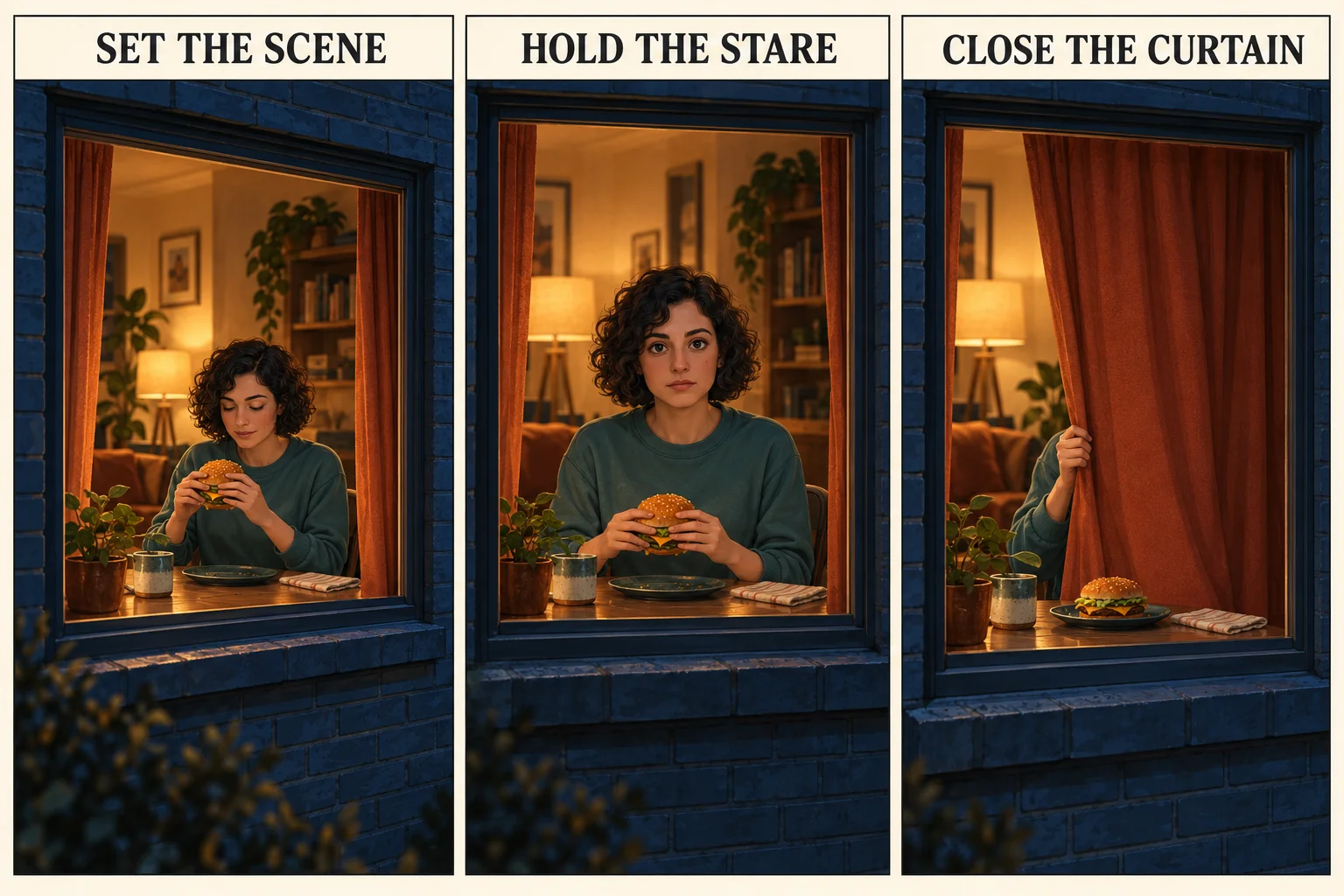
A useful Burger Thru Window sequence has three parts. The first establishes the window and snack. The second holds eye contact. The third ends the encounter. Give each part a job instead of asking every object in the room to move.
| Part | What the viewer should understand | Direction to try |
|---|---|---|
| Establish | Someone is eating inside; we are outside. | Begin near one illuminated window with the burger visible. |
| Discover | The person has noticed the camera. | Use a small eye movement, then hold a deadpan expression. |
| End | The character decides the moment is over. | Draw a reachable curtain across the window. |
You do not need an elaborate flight across the city. A small approach from a nearby exterior position can establish the same perspective while keeping the face large enough to recognize. Let the stillness after discovery carry the humor.
Prepare a photo and a believable window scene
Choose a clear portrait of yourself or an adult who has agreed to appear. Even lighting and an unobstructed face make it easier to judge likeness later. Avoid sunglasses, strong beauty filters, and a burger already covering most of the mouth. Start with one person so the gaze has an obvious owner.
To use that portrait directly, try the one-photo Burger Thru Window video maker, which supplies the window scene and performance direction. Continue with the image-preparation steps below when you want to design the starting composition yourself.
For this workflow, build the complete starting composition before animation. Open the AI Image Generator, select a model that accepts a reference, and use your portrait to create the apartment scene. Check the new image before taking it into video. A useful image prompt is:
Place the adult from the reference photo at a small dining table inside a warmly lit apartment at night. View the room from outside through one window at a slight angle. Preserve the person's facial features and hairstyle. They hold one burger below their chin and look down at it. Show both hands, the window frame, and a fabric curtain gathered beside the window. Keep the face clear, reflections subtle, and packaging unbranded.
Position the curtain within easy reach. Keep window bars away from the eyes, and leave space between the burger and chin. For a vertical clip, prepare a portrait composition now; cropping a wide scene later can remove the curtain or the hand that needs to pull it.
Create Burger Thru Window on ImgToImage AI
1. Open the video workspace
Go to the video workspace, sign in, and select Seedance 2.0 Mini from the model menu. The steps below use its start-frame workflow to animate the apartment scene. Confirm the displayed settings and credit estimate before generating, especially after changing the duration or resolution.
2. Upload the finished scene image
Upload the apartment composition to Start frame as a JPEG, PNG, or WebP image up to 10 MB. Leave End frame and Reference images empty; Seedance 2.0 Mini uses reference images separately from frames. One prepared scene establishes the face, room, and burger together before motion begins.
3. Begin with a short discovery shot
Try five seconds for the slight camera approach and eye contact. Seedance 2.0 Mini currently supports 4–15 seconds and 480p or 720p output. Select 9:16 for a vertical result, 16:9 for landscape, or Auto to adapt to the input. Match the starting composition to the intended output format.
4. Generate and review
Paste the motion prompt below, check the estimate, and generate a first attempt. Follow progress in video history and play the result through. For this first Burger Thru Window clip, prioritize a recognizable face, stable hands, and an obvious moment of discovery before requesting a longer sequence.
A Burger Thru Window prompt to adapt
Describe visible movement rather than relying on the effect's name. Change the clothing or lighting details to match your starting image:
Animate the person and apartment in the reference image. The camera remains outside the window and moves slowly a little closer at the same angle. The seated adult holds one burger below their chin, initially looking down at it. They stop, lift their eyes toward the lens, and hold a quietly unimpressed stare. Preserve their face, clothing, hands, burger, window geometry, and warm room lighting. Keep the curtain open and still. Use one continuous shot with no cuts. Reflections remain faint and never cover the face.
This is a suggested starting prompt, not a tested preset. If the camera movement destabilizes the window, replace the approach with a fixed camera. If the stare works, try one small bite in a later attempt, allowing time to lower the burger before eye contact. Separating those experiments makes it clearer which instruction affects the result.
Add the curtain ending without tangling the action
The ending asks the model to coordinate a hand, fabric, and window. Give the hand a simple task. Prepare a matching image with the burger resting on the table and one free hand near the curtain edge. Keep the person seated if the curtain is reachable from there.
Try this direction for a separate ending shot:
From the same exterior viewpoint, the seated adult keeps a deadpan expression and uses their free hand to draw the nearby curtain horizontally across the window. The burger stays on the table. Preserve the room and window frame. The camera is still. End with the fabric covering the view.
Download the successful shots and assemble them in an external editor. Keep the window's position similar across the cut. If the closing motion remains unreliable, finish on the held stare; the joke can still land without forcing an unstable final gesture.
Fix the details that break the illusion
Review your Burger Thru Window result at normal speed, then pause at the moment the gaze changes. Watch the burger and fingers during movement, and use the window frame as a stationary reference.
| Problem | Adjustment to try first |
|---|---|
| The camera travels through the glass | Specify that it stays outside; reduce or remove the approach. |
| Reflections hide the face | Simplify the source image and request faint reflections. |
| Fingers merge with the burger | Begin with clearly separated hands and remove the bite action. |
| The character already stares from the start | Use a source image with eyes directed toward the food. |
| The curtain moves before the reaction | Keep it still in the first shot; generate the ending separately. |
| The face changes as the camera nears | Shorten the move and avoid a simultaneous head turn. |
Change one instruction at a time while keeping the same source and settings. A higher resolution will not reliably correct an impossible hand position. Fix the reference when the problem is already visible in the still image; simplify the movement when it appears only during animation.
Give the clip a caption and a clean finish
Trim a long inactive opening, but leave enough time for viewers to understand the window. Allow a brief pause after eye contact before the ending. Watch the edit without sound first: the discovery should remain understandable.
Add a caption with a specific situation, such as “My snack break has an audience” or “When the group chat finds your midnight dinner.” Keep text away from the face, hands, and curtain edge. Preview it on a phone to check that interface controls do not cover the joke.
ImgToImage AI has no built-in editing timeline or music generator. Add suitable audio in your editor or posting app, and choose material available for your intended use. A Burger Thru Window prompt does not supply a particular soundtrack. Describe the finished scene as your AI remake when sharing it.
Questions before your first attempt
Can I make this with only a selfie?
Yes. The selfie-to-window-meme generator accepts one clear selfie and creates a personal window scene. In the manual workflow described above, first turn it into the complete window scene using an image-capable generator, then animate that scene. Review likeness after both stages.
Is there a dedicated template on this platform?
Yes. The Burger Thru Window tool creates a 14-second video from one portrait, with 9:16 and 480p selected by default. You can change the resolution and aspect ratio. The general image-to-video workflow above remains available when you want to design the scene yourself.
Can I generate it for free?
Check your available credits and the displayed estimate for the selected settings. Any free balance must cover the request. Allow for a scene image and possible retries as well as the video itself.
Can I change the food or character?
You can experiment with an original character or another snack. Keep one clear eating gesture and the moment of discovery. Start with a simple handheld item before trying utensils, spills, or several people.
Make your own window moment
Prepare a clear scene, keep the camera outside, and make the change in eye contact easy to read. Open the AI Video Generator to create your first Burger Thru Window attempt. Once the snack and stare work together, decide whether a curtain ending adds the finishing touch.
For the prepared snack, stare, and curtain sequence, start with a portrait in the window peeper AI video generator. Review the result for likeness and clear eye contact before sharing it.
Keep exploring
 Video Guides
A low camera, an absurd stack of cash, and a perfectly serious face. Break down a real Money Flex AI example and plan your own version with practical prompts.
 Video Guides
Step through the gate and make the path your stage. Create a Fergie Baby AI walk from your photo, with a confident stride, expressive gestures, and a camera that keeps pace.
 Video Guides
An outrageous dunk, a stunned defender, and a cheeky finish. Create a Basketball Middle Finger AI clip with your own cast and a play the camera can follow.
 Video Guides
The party keeps moving, but you stop to stare. Make a Bby Wow Guy AI scene with your photo, a concha, and the awkward pause that makes the joke land.