





Image to Image AI logoImage to Image AI
  • Home
  • AI Image Generator
  • AI Video Generator
  • Tools
  • Nano Banana 2.1
  • Flux 3 Klein
  • Seedream 5.0 Pro
  • Seedream 5.5
  • GPT Image 2.5
  • GPT Image 2.6
  • MiniMax H3 Image
  • Kling 4.0
  • Grok Imagine Video 1.5
  • MiniMax H3 Max
  • Seedance 2.5
More
  • Blog
  • Pricing

Guest

Save your creations

Credits—
  1. Home

La Tormenta De Arena AI Club Spotlight

Create a La Tormenta De Arena AI scene where a crowded room disappears behind one unforgettable look. Upload one or two portraits, place your cast across a nightclub balcony and dance floor, and let a white spotlight reveal the person below. The prepared direction builds a short cinematic encounter around your photos, with blue lighting, gentle movement, and a quiet moment of recognition.

Create my spotlight video
Watch the La Tormenta De Arena AI video preview.

Reference image

Required · 1–2 images
315
Checking your sign-in status…
Strictly prohibits adult / NSFW content

AI Video Generators to Explore

Find new ways to animate your photos, from dance clips and outfit changes to imaginative scenes.

  • Christmas Dance Trend

  • Christmas Photobooth

  • Bicep Heart Trend AI

  • Apartment Dance

  • AI Trouble Maker Video

  • Elevator Outfit Change AI

  • Skull Cap Trend AI

  • Stones to Castle AI

  • WYW My Sweetie Dance

  • Black Friday Video Maker

  • Baby Born with a Mustache

  • Burger Thru Window

  • Outstanding Tiny Desk AI

Page 1 of 2

What is La Tormenta De Arena AI?

La Tormenta De Arena AI is associated with a club-scene trend built around searching and being found. Its name comes from the Dorian song, while the balcony-and-crowd imagery is commonly linked to Tres metros sobre el cielo. The recognizable idea is visual: someone looks down, a light picks out another person, and their eyes meet across the room.

Here, La Tormenta De Arena AI creates an original scene from your references. Image one guides the person at the balcony; an optional second portrait guides the person on the floor. With only one photo, the prepared direction supplies a fictional adult for the second role. You can make the encounter romantic, friendly, or quietly funny without changing the central reveal.

The Spanish title can suggest a literal sandstorm, but the club format works through people, distance, and light. This page uses atmospheric haze to make the beam visible. It does not need a desert, flying sand, or an extreme weather effect. A restrained setting keeps attention on the expressions and makes the final upward glance easier to understand.

Your La Tormenta De Arena AI clip is newly generated rather than a face replacement inside movie footage. It can reinterpret clothing, expressions, background guests, and shot timing. The scene images on this page are original AI-generated concepts for the visual direction, not screenshots proving a particular video result. Use them to plan atmosphere and framing while judging your own completed take separately.

Build a La Tormenta De Arena AI moment that reads clearly

Give the viewer a simple route through the room. Establish the watcher, reveal the space below, and finish on the person in the light. Each beat should make the relationship clearer without requiring a caption to explain the geography.

Start above the crowd

Open with the balcony rail and the first person in a medium shot. A slight lean and an attentive look establish their purpose. Keep part of the lower room visible so the viewer understands where they are looking. For La Tormenta De Arena AI, this first composition is the setup: it creates anticipation before the other face appears. Avoid a tight crop that removes the railing and makes the location unclear.
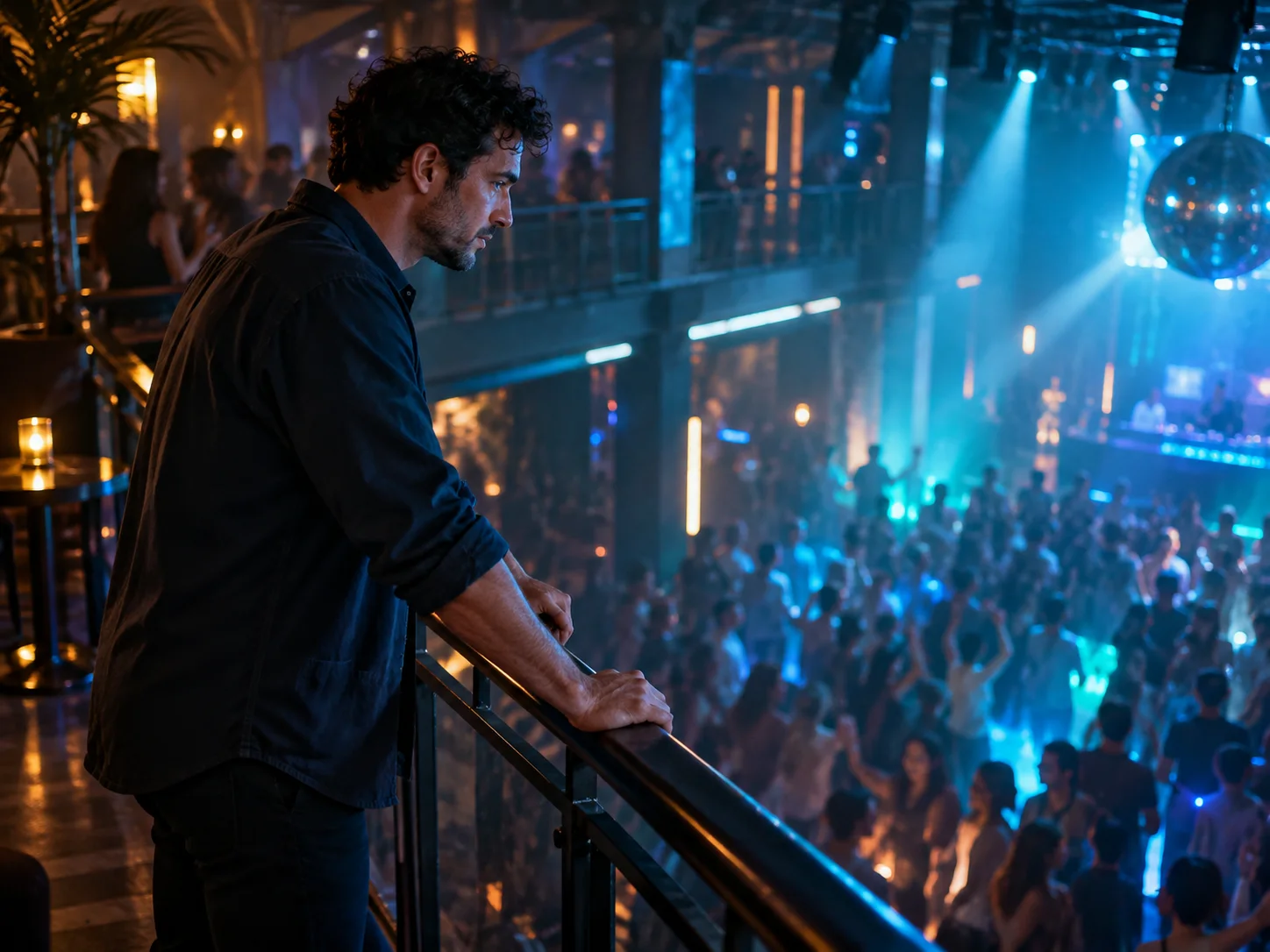
An adult man leans on a nightclub balcony railing and watches the dance floor below
A balcony view sets the scene for a La Tormenta De Arena AI encounter across a crowded nightclub.

Let one beam reveal the second face

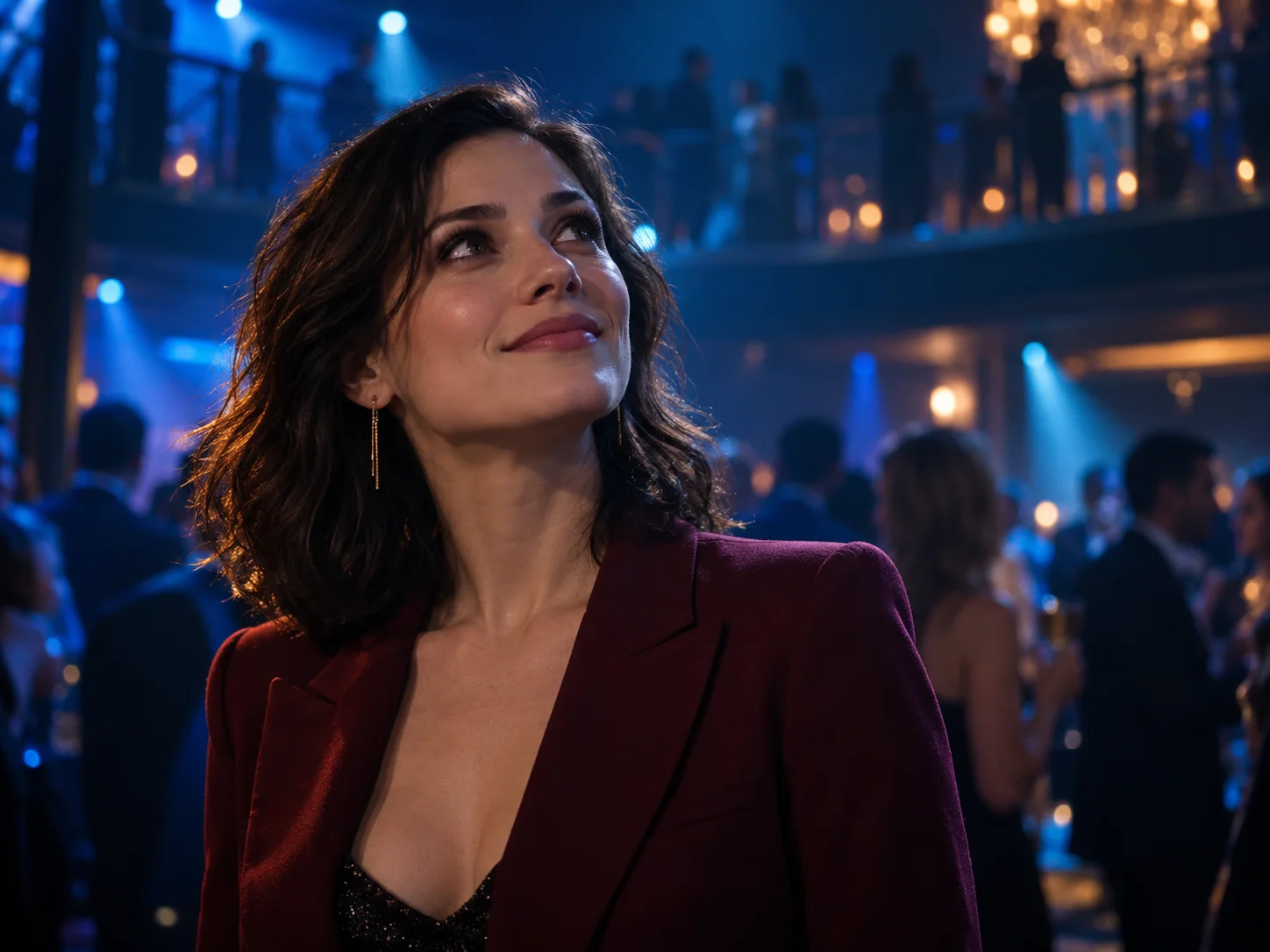
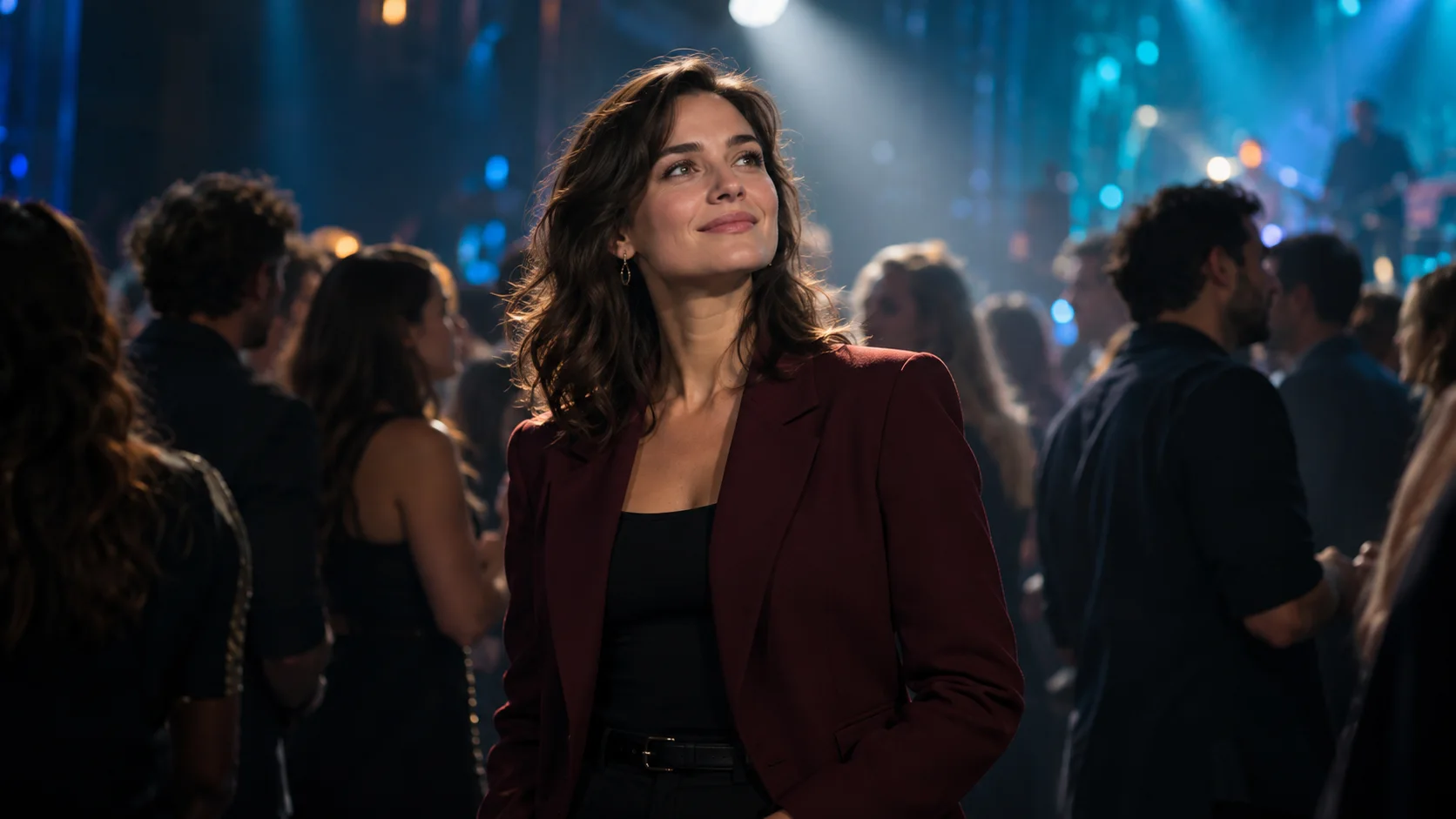
The spotlight is the turning point in La Tormenta De Arena AI. The preset uses a soft white beam against a darker blue room, with surrounding guests remaining less prominent. The person below can pause, lift their chin, and return a small smile. A modest expression often tells the story more clearly than a large dance move. Keep the beam broad enough to show eyes and shoulders without washing out facial detail.

An adult woman in a burgundy jacket looks upward under soft white event lighting
A softly lit face stands out against the blue nightclub crowd, bringing the connection into focus.

End on recognition

Hold the final look for a brief moment so the audience has time to connect the two people. The La Tormenta De Arena AI direction stops at that recognition rather than adding a kiss, a sudden reunion, or another location. That restraint gives the short sequence a satisfying finish. When reviewing a take, check that the gaze points upward and that the closing expression remains readable at normal playback speed.

A woman in a burgundy jacket looks toward a balcony with a small smile of recognition
An upward glance and a quiet smile turn a chance nightclub encounter into a moment of recognition.

How to make a La Tormenta De Arena AI video

  1. 01

    Prepare one or two portraits

    Choose clear JPEG, PNG, or WebP images, each within the 10 MB upload limit. Use an unobstructed adult face with visible shoulders and balanced light. Put the balcony watcher first and the spotlight subject second. Separate portraits make the roles easier to distinguish than a group selfie. Similar image quality helps both people remain equally recognizable.

  2. 02

    Choose your first settings

    Start La Tormenta De Arena AI at the default 480p, landscape 16:9, and 15 seconds. You can choose a whole-second duration from 10 to 15, or select 768p or 1080p. Other aspect ratios are available when a different composition suits your idea. Review the current credit estimate after changing the settings, since resolution and duration affect the cost.

  3. 03

    Check the prepared scene

    The core scene is already prepared, with no prompt to type. Check the portrait order and selected format before you start. The first image guides the balcony watcher, and the second guides the person below. Expressions and clothing in those photos provide the visual reference while the preset supplies the lighting, restrained movement, and final moment of recognition.

  4. 04

    Generate and inspect the full scene

    Sign in, confirm your portraits and estimate, and submit the request. Once La Tormenta De Arena AI finishes, watch from the opening rail shot through the final glance. Check both identities, the room layout, and the light transition. Download the strongest take, then add your chosen caption or soundtrack in an editor before sharing it with your intended audience.

AI Video Generators for Your Next Project

Turn a photo into a short video for a personal story, a social post, or a playful idea.

  • Outstanding Tiny Desk AI

  • Baby Born with a Mustache

  • Stones to Castle AI

  • Skull Cap Trend AI

Prepare photos for La Tormenta De Arena AI

A clear reference gives the scene a useful starting point. Choose an image that shows who the person is before worrying about dramatic lighting. A clean everyday portrait often works better than a dark photo taken inside an actual club.

For La Tormenta De Arena AI, keep hair, eyes, and the outline of the face visible. Avoid sunglasses, hands covering cheeks, strong beauty filters, or tiny faces inside a distant landscape. A chest-up crop provides clothing information while leaving enough detail for the face. Do not crop so tightly that the forehead or chin disappears; the generated camera may need to change the viewing angle.

Choose photos of adults who have agreed to appear in your scene. If the two references show very different clothing or hairstyles, choose images whose visible details already suit the scene. The tool treats references as guidance, so likeness and role assignment can vary. Check that one face has not drifted toward the other after a cut, especially when both portraits have similar features.

Vertical framing makes the balcony-to-floor relationship feel tall and emphasizes the faces. Landscape leaves more room for architecture and surrounding guests. For your first La Tormenta De Arena AI attempt, choose the intended shape before generating rather than relying on a heavy crop afterward. If a face approaches the edge, try a reference with more space around the featured person or choose a wider output ratio.

Give La Tormenta De Arena AI your own meaning

The same room can support different relationships. Choose portraits that fit the relationship, then use your finished caption to give the final glance its meaning. A small emotional choice is more useful than adding several unrelated visual effects.

A quiet anniversary message

Use La Tormenta De Arena AI to frame a familiar partner as the one person who stands out in a room. The prepared scene aims for a gentle smile and a patient reveal. Add the date or a personal dedication afterward, where the lettering stays easy to control. Let the expressions carry the message instead of requesting a long spoken declaration.

A best-friend reveal

A playful version can end on a friend with a knowing look. Keep the watcher curious and the person below calmly amused, so the contrast provides the joke. La Tormenta De Arena AI works as a short setup for a group-chat caption or a reunion announcement. Avoid making the background crowd compete with the face that delivers the payoff.

A cinematic introduction

Make a profile introduction around a recognizable portrait and a simple visual mood. One photo is enough to begin with a fictional counterpart. The balcony establishes presence while the final cut adds curiosity. Keep names, release information, or event details in the finished edit. This lets the generated scene remain focused on expression, lighting, and spatial continuity.

Review your La Tormenta De Arena AI scene

Judge the sequence as a small story, not just a beautiful frame. A strong take makes it obvious who is searching, where the other person stands, and why the last look matters.

Pause around transitions to check the rail, shoulders, hands, and faces. The balcony should remain above the same dance floor, and the spotlight should find the intended person rather than a random guest. If the room changes shape or the camera rushes past the reveal, try a clearer portrait or a longer available duration for another take. Compare the completed clips carefully; the preset stays the same, but generated timing and facial details can vary between attempts.

This La Tormenta De Arena AI preset requests subdued club ambience without dialogue or a recognizable song. The original Dorian recording is not included. Listen to the generated result and replace or mute audio if needed. Add music from a source available for your intended use, then check how its timing supports the reveal. Keep the final caption clear that the scene is AI-generated.

La Tormenta De Arena AI questions

Yes. The first image guides the balcony watcher. Without a second image, the other featured person is fictional. Upload a second portrait when you want to guide both roles.

No. It generates a new setting and performance from photos and prepared directions. Exact camera paths, actor likenesses, or frame-by-frame matching are not promised.

Choose any whole-second duration from 10 through 15; the default is 15. A longer take gives the search and recognition more breathing room, though individual shot timing can vary.

Generation uses credits. Check your signed-in balance and the current estimate before submitting. Available free credits may cover a request, but unlimited free generation is not included.

This page accepts one or two reference images. It does not take a source video or expose start and end frames. Use the photo workflow to generate a fresh interpretation.

Yes, through an editor or a posting platform where the track is available for your use. This tool does not supply that recording or guarantee synchronization to a particular musical beat.

Create your La Tormenta De Arena AI encounter

Choose the face on the balcony and the person worth finding. Start with clear portraits, keep the mood simple, and turn a glance across the room into your own short cinematic scene. Review the result, add your finishing touches, and share the moment.

Upload portraits and start
Image to Image AI logoImage to Image AI

A fresh take on your image. Explore new styles and scenes with AI.

Customer supportsupport@imgtoimageai.com

Tools

  • Remove Glare from Glasses
  • Remove Glare from Photo
  • Photo to Line Art
  • Image Upscaler
  • Realistic Selfie Generator
  • Christmas Photobooth
  • AI 3D Figure Generator
  • Selfie With Santa
  • Christmas Dance Trend
  • Motorcycle AI
  • AI Photo Booth
  • Photo to Sticker
  • QR Code Enhancer
  • AI Long Hair Filter
  • Bicep Heart Trend AI
  • Happy Birthday GIF with Name
  • Apartment Dance
  • AI GIF Generator
  • Executive Portrait Maker
  • AI Trouble Maker Video

Learn more

  • Tools
  • Blog
  • Pricing

Legal

  • Privacy Policy
  • Terms of Service
  • Refund Policy
  • Contact

© 2026 Image to Image AI