





Image to Image AI logoImage to Image AI
  • Home
  • AI Image Generator
  • AI Video Generator
  • Tools
  • Nano Banana 2.1
  • Flux 3 Klein
  • Seedream 5.0 Pro
  • Seedream 5.5
  • GPT Image 2.5
  • GPT Image 2.6
  • MiniMax H3 Image
  • Kling 4.0
  • Grok Imagine Video 1.5
  • MiniMax H3 Max
  • Seedance 2.5
More
  • Blog
  • Pricing

Guest

Save your creations

Credits—
  1. Home

WYW My Sweetie Dance

Put your photo at the center of a WYW My Sweetie Dance inspired performance. A springy stance, compact arm accents, and quick changes of weight bring Jersey Club energy into a short studio scene. Upload one clear photo, choose your video settings, and generate an original solo interpretation without filming a routine or writing a prompt. Keep the full body in view so the rhythm has room to read.

Upload my photo
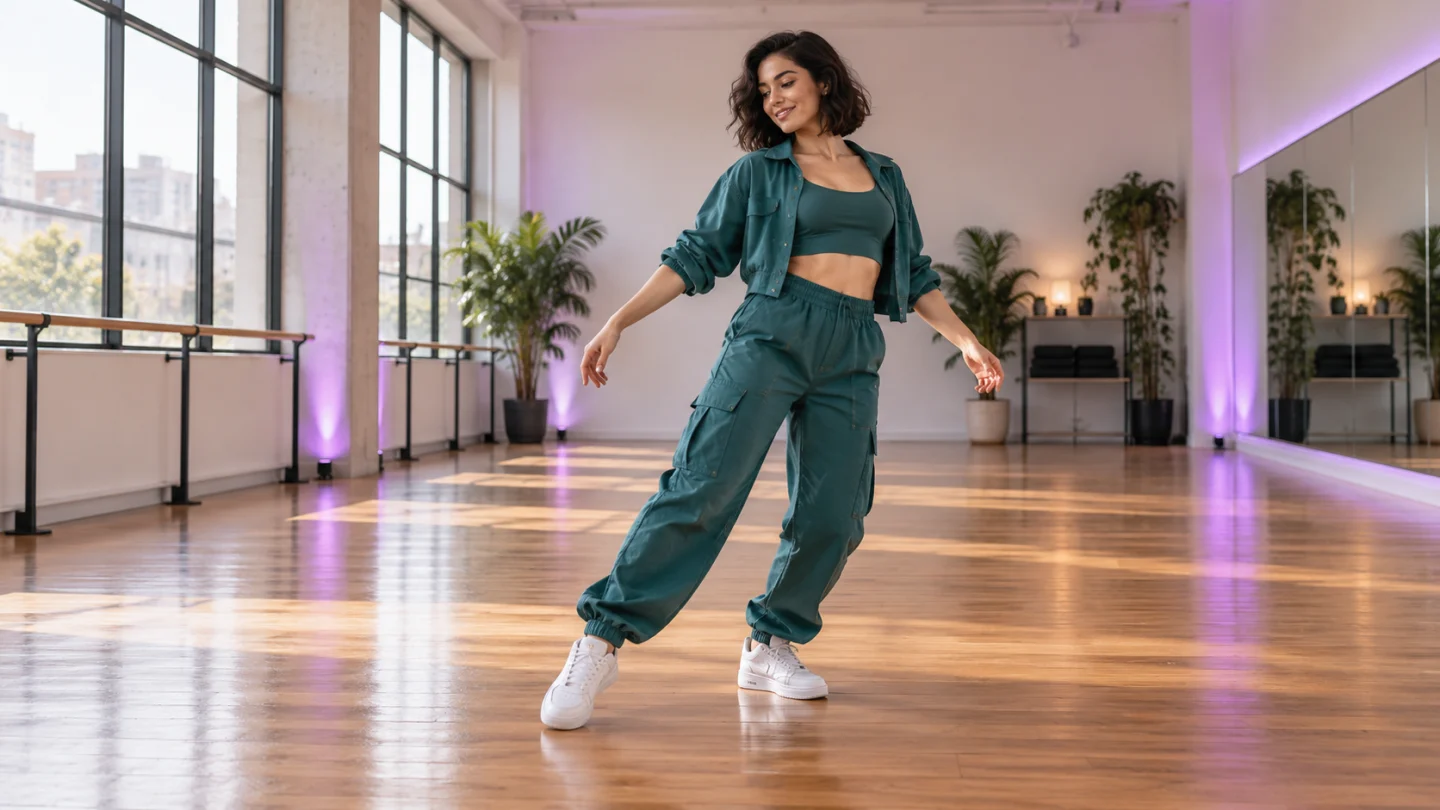
A studio dancer keeps both sneakers visible during a springy WYW My Sweetie Dance inspired performance.

Reference image

Required · 1 image
315
Checking your sign-in status…
Strictly prohibits adult / NSFW content

AI Video Generators to Explore

Find new ways to animate your photos, from dance clips and outfit changes to imaginative scenes.

  • Christmas Dance Trend

  • Christmas Photobooth

  • Bicep Heart Trend AI

  • Apartment Dance

  • AI Trouble Maker Video

  • Elevator Outfit Change AI

  • Skull Cap Trend AI

  • Stones to Castle AI

  • Black Friday Video Maker

  • La Tormenta De Arena AI Club Spotlight

  • Baby Born with a Mustache

  • Burger Thru Window

  • Outstanding Tiny Desk AI

Page 1 of 2

What is WYW My Sweetie Dance?

WYW My Sweetie Dance is a short social dance format associated with the track “Wyw my sweetie #JerseyClub” by nissi and 25Hzz. Search results include solo performances, partner versions, mirrored tutorials, and different camera angles. The common attraction is a buoyant rhythm carried through the knees, feet, shoulders, and small arm movements. You can recognize the energy even when the setting and performer change.

This WYW My Sweetie Dance tool creates a new solo video from a photograph. Its prepared direction asks for an upbeat studio performance with grounded steps and a stable camera. It does not take a choreography video as input, transfer a specific dancer’s skeleton, or reproduce an existing clip frame by frame. Think of the result as a personal interpretation with familiar rhythmic qualities rather than a dance lesson or an exact motion copy.

A strong source photo helps connect the performance to you. Choose one person with a readable face and as much of the body visible as possible. A standing photo in comfortable clothing provides useful information about proportions and outfit shape. When the reference is cropped at the shoulders, the generator must invent more of the body and clothing, which gives you more details to check in the completed video.

For a WYW My Sweetie Dance post, the visual rhythm and soundtrack need separate attention. This page does not bundle or guarantee the original song. Review any generated audio and add the sound you intend to use through your editor or destination platform. Align its accents to the movement that actually appears in your chosen take; a recognizable beat cannot repair a pose that changes unnaturally halfway through.

What makes WYW My Sweetie Dance work

Look for a clear subject, a coherent setting, and a result that reads at normal viewing size. These scenes show the visual details to consider when choosing your reference and reviewing your result.

Keep the bounce grounded

The WYW My Sweetie Dance effect starts with a soft bend through the knees and small shifts between the feet. A medium-wide composition makes those weight changes visible without forcing the camera to chase the performer. The prepared scene uses a simple studio floor, open space, and restrained background detail so your eye goes to the moving person. In the finished take, look for planted shoes, balanced hips, and an upper body that responds naturally. A convincing small movement usually communicates more rhythm than an ambitious kick with a distorted leg or a foot sliding across the floor.
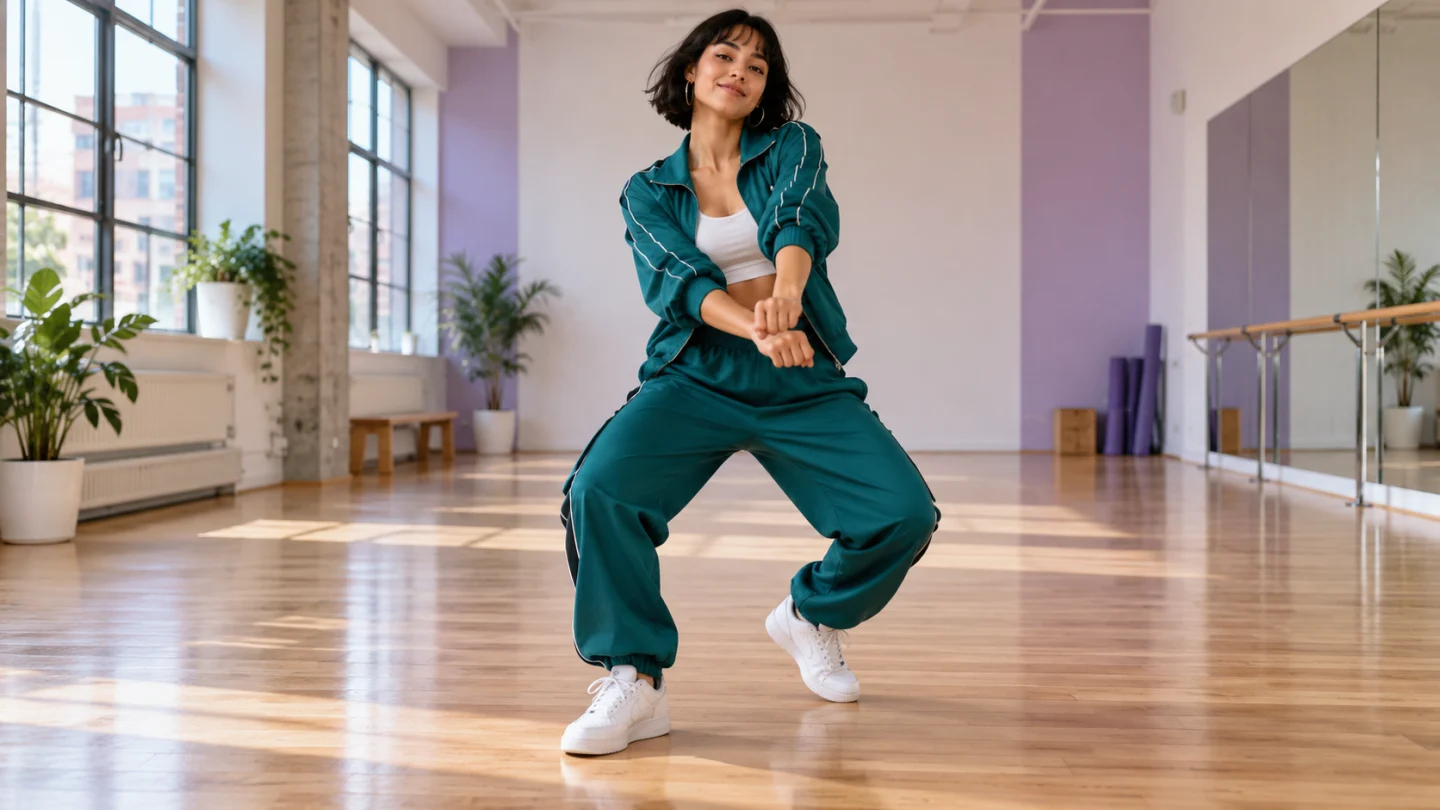
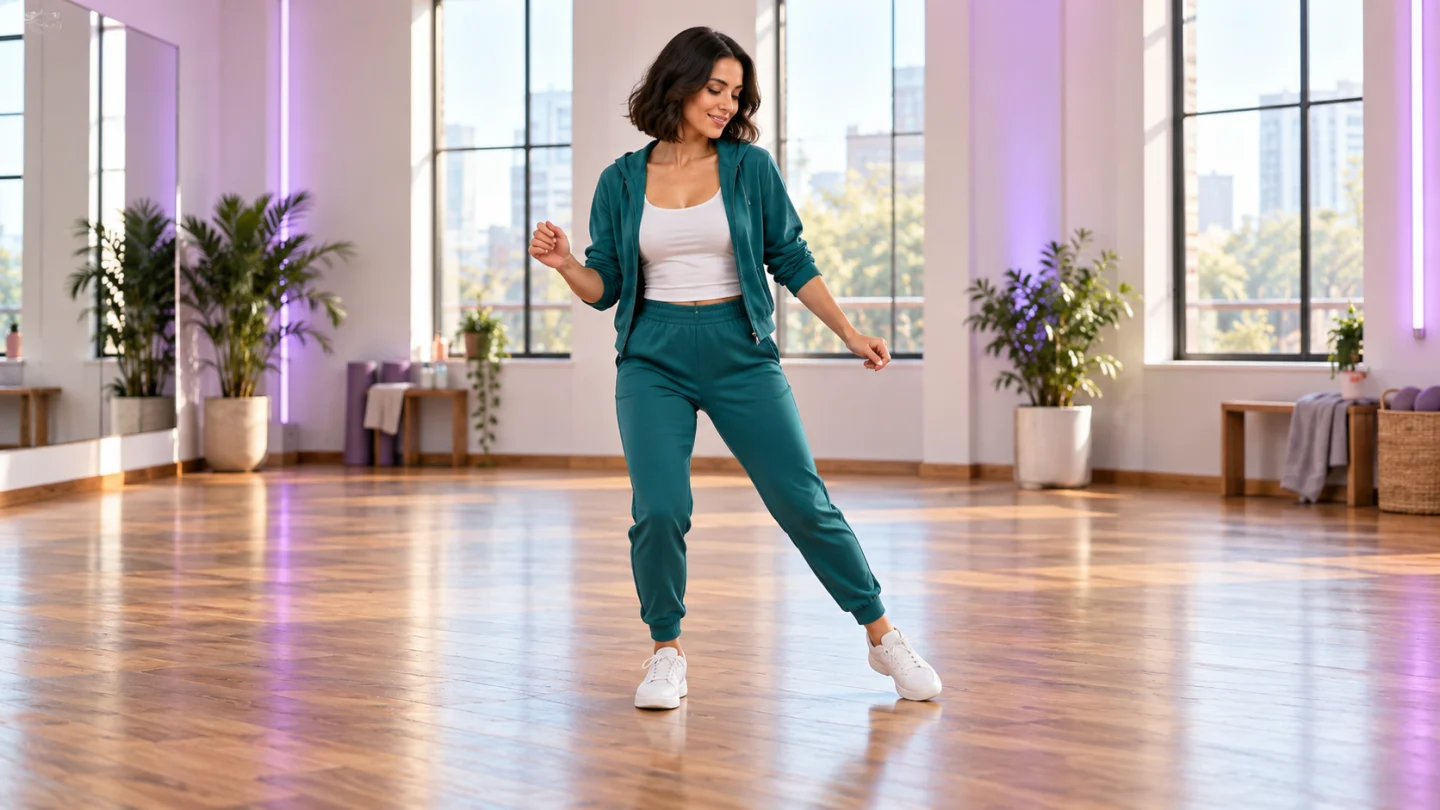
A studio dancer keeps both sneakers visible during a springy WYW My Sweetie Dance inspired performance.

Keep the footwork easy to follow

Quick steps give a WYW My Sweetie Dance interpretation its buoyant feel, but the feet still need a clear relationship with the floor. Look for a planted supporting foot, a small outward tap, and knees that bend in the same direction as the shoes. The prepared performance favors compact movement over high kicks or leaps. Leave space below the ankles when choosing your frame, then check that the soles do not slide through the studio floor. A readable step gives the shoulders and arms a natural beat to follow without hiding the dancer’s face.

Compact side steps and visible floor contact keep the WYW My Sweetie Dance footwork readable.

Give the final pose room

A WYW My Sweetie Dance clip benefits from an ending that settles instead of stopping in the middle of a movement. The prepared direction brings the performer back to a comfortable stance with a relaxed expression. This gives you a usable place to trim, add a closing caption, or connect the clip to another shot. Keep some margin around the head and shoes before generating. When you inspect the finish, compare the face with the opening and check that the outfit, studio geometry, and direction of light still belong to the same scene.

A relaxed finishing pose gives the WYW My Sweetie Dance clip a clear place to end.

How to use WYW My Sweetie Dance

  1. 01

    Upload one clear photo

    Start your WYW My Sweetie Dance project with one JPEG, PNG, or WebP image. The upload limit is 10 MB per image in the interface. Use a sharp reference with one clearly visible adult and balanced lighting. Choose the photograph that already has the framing and expression you want to carry into the result. A clean source gives the prepared effect more useful detail than a dark screenshot or a heavily filtered selfie.

  2. 02

    Choose your output settings

    Select the aspect ratio before generating with WYW My Sweetie Dance. A portrait frame usually gives one person comfortable space on a phone, while a wider frame includes more of the surroundings. Review the displayed credit estimate after changing settings. The default is 480p and 15 seconds; available durations run from 10 to 15 whole seconds, with 768p and 1080p also offered.

  3. 03

    Generate with the prepared effect

    The creative direction for WYW My Sweetie Dance is already built in. There is no prompt field, template text to paste, or separate performance video to upload. Sign in, check the reference image and selected settings, then submit the request. Watch the generation status and review the completed result before deciding whether another attempt would help. Each submission uses the current estimate shown by the generator.

  4. 04

    Review and download your result

    Compare the completed WYW My Sweetie Dance result with your original photo. Watch the entire clip and pause at transitions to inspect the face, hands, clothing, and background. Listen to any generated audio before keeping it. Add your chosen music or captions in a separate editor, then check that the final frame remains clear after cropping.

AI Video Generators for Your Next Project

Turn a photo into a short video for a personal story, a social post, or a playful idea.

  • Outstanding Tiny Desk AI

  • Baby Born with a Mustache

  • Stones to Castle AI

  • Skull Cap Trend AI

Get more from WYW My Sweetie Dance

Build your WYW My Sweetie Dance reference around clarity. Soft daylight, an unobstructed face, and a standing pose make a useful combination. Avoid crossed legs, hands covering the face, or a coat that hides every body joint. Clothing does not need to be elaborate: a clear silhouette and visible shoes give the model a simpler starting point. Your original pose guides appearance, while the built-in direction supplies the movement.

The default WYW My Sweetie Dance format is vertical 9:16 at 480p for 15 seconds. That composition gives a solo dancer height while leaving the feet visible. Ten seconds can suit a shorter reaction, and the other supported ratios offer room for a wider setting. Choose the frame according to the photo rather than assuming that every portrait will expand equally well into a full-body performance.

Watch your WYW My Sweetie Dance result once for the overall mood, then again for continuity. Pause where the knees bend, an arm passes the torso, or the face turns. Look at the number and shape of fingers, the contact between shoes and floor, and whether the head remains attached naturally to the shoulders. If the motion feels unstable, start with a clearer reference and a simpler visible outfit before trying a more complicated composition.

When finishing a WYW My Sweetie Dance edit, let the performer remain the main subject. Keep captions above or beside the moving limbs and check the crop at the final phone display size. You can cut away an awkward opening or shorten a held ending in your editor. This page generates the video itself; soundtrack placement, text overlays, transitions between separate clips, and publication happen in your own editing workflow.

Ideas for your WYW My Sweetie Dance result

Choose an occasion that gives the finished image or video a purpose. Your source photo and the context you add afterward make the same prepared effect feel personal.

A playful personal post

Use WYW My Sweetie Dance to turn a familiar portrait into an unexpected studio performance. A casual photo can make the change especially easy for friends to recognize. Pair the result with a short caption about finally joining the routine or finding your rhythm. Let the first second establish the person before placing text over the frame. The humor works best when the face stays readable and the movement feels relaxed rather than overloaded with effects.

A shared solo challenge

Friends can each make a WYW My Sweetie Dance version with their own photo, then compare the performances in a combined edit. Generate each person separately: this page accepts one reference and directs one dancer, so it does not promise a synchronized duo. A shared studio mood and matching crop can still give the collection a clear visual connection. Put the individual clips beside each other afterward if you want a friendly split-screen challenge.

An introduction with movement

A WYW My Sweetie Dance inspired clip can add a playful beat to a creator introduction, a birthday montage, or a casual community update. Keep the context short enough that the dance remains enjoyable on its own. For a longer project, use the generated performance as one shot among other footage. Review the expression and clothing carefully before making it your opening image, since the recognizable person supplies the connection to the rest of your story.

WYW My Sweetie Dance questions

This WYW My Sweetie Dance page is configured for one photo and one solo performer. It does not provide a partner slot or motion-reference upload. Generate separate solo clips if you want to assemble a group edit afterward.

No. WYW My Sweetie Dance here uses prepared text direction and your photo to create fresh motion. The bounce and footwork are creative guidance; exact steps, beat timing, facial likeness, and a particular sequence are not guaranteed.

The WYW My Sweetie Dance song is not bundled with this tool. Listen to the output, then choose and align your intended soundtrack in an editor or social app. Generated audio may differ between attempts.

No. WYW My Sweetie Dance uses a fixed creative direction, so you only upload your photo and choose the available output settings. Custom prompt input is disabled. If you want a different creative concept, use the general video generator rather than trying to add instructions through the upload.

The WYW My Sweetie Dance generator displays the current credit estimate before submission. The amount can change with the available output settings, so use that estimate when making your choice. This page does not promise a free render, a fixed processing time, or a particular creative result.

Try WYW My Sweetie Dance with your own photo

Choose a clear reference and let WYW My Sweetie Dance turn it into a focused visual idea. Start with the available defaults, review the face and important details, and download the version you want to keep. A thoughtful source photo and a careful final review give your project a stronger starting point.

Choose a photo and start
Image to Image AI logoImage to Image AI

A fresh take on your image. Explore new styles and scenes with AI.

Customer supportsupport@imgtoimageai.com

Tools

  • Remove Glare from Glasses
  • Remove Glare from Photo
  • Photo to Line Art
  • Image Upscaler
  • Realistic Selfie Generator
  • Christmas Photobooth
  • AI 3D Figure Generator
  • Selfie With Santa
  • Christmas Dance Trend
  • Motorcycle AI
  • AI Photo Booth
  • Photo to Sticker
  • QR Code Enhancer
  • AI Long Hair Filter
  • Bicep Heart Trend AI
  • Happy Birthday GIF with Name
  • Apartment Dance
  • AI GIF Generator
  • Executive Portrait Maker
  • AI Trouble Maker Video

Learn more

  • Tools
  • Blog
  • Pricing

Legal

  • Privacy Policy
  • Terms of Service
  • Refund Policy
  • Contact

© 2026 Image to Image AI