
Image to Image AI logoImage to Image AI
  • Home
  • AI Image Generator
  • AI Video Generator
  • Tools
  • Nano Banana 2.1
  • Flux 3 Klein
  • Seedream 5.0 Pro
  • Seedream 5.5
  • GPT Image 2.5
  • GPT Image 2.6
  • MiniMax H3 Image
  • Kling 4.0
  • Grok Imagine Video 1.5
  • MiniMax H3 Max
  • Seedance 2.5
More
  • Blog
  • Pricing

Guest

Save your creations

Credits—
  1. Home

Outstanding Tiny Desk AI Video Generator

Make an Outstanding Tiny Desk AI video with your photos and a room full of soul. Cast yourself as the smiling lead, bring friends into the band, and create a compact office performance with joyful vocals and a featured saxophone solo. Upload one to five reference images, choose a duration from 10 to 15 seconds, and start with the default vertical format.

Create my desk concert
Watch an Outstanding Tiny Desk AI video move from a joyful vocal performance to a featured saxophone solo in a warm office setting.

Reference image

Required · 1–5 images
315
Checking your sign-in status…
Strictly prohibits adult / NSFW content

AI Video Generators to Explore

Find new ways to animate your photos, from dance clips and outfit changes to imaginative scenes.

  • Christmas Dance Trend

  • Christmas Photobooth

  • Bicep Heart Trend AI

  • Apartment Dance

  • AI Trouble Maker Video

  • Elevator Outfit Change AI

  • Skull Cap Trend AI

  • Stones to Castle AI

  • WYW My Sweetie Dance

  • Black Friday Video Maker

  • La Tormenta De Arena AI Club Spotlight

  • Baby Born with a Mustache

  • Burger Thru Window

Page 1 of 2

What is Outstanding Tiny Desk AI?

Outstanding Tiny Desk AI describes a photo-driven take on the desk-concert meme: familiar faces appear as an unexpectedly cheerful soul band in an intimate office setting. The recognizable ingredients are close microphones, crowded bookshelves, a keyboard, an expressive singer, and a saxophone moment. The comedy comes from the cast and their delight in performing together.

The musical reference is Charlie Wilson performing The Gap Band song Outstanding at his 2023 NPR Tiny Desk concert. NPR published the concert during Black Music Month, and Outstanding appears at the end of its set list. Tiny Desk refers to that close, informal performance setting; it does not mean shrinking people into figurines or placing a miniature band on a tabletop.

The October 2026 wave includes the college-football All-Loss parody shared by @theburnerfromhe11 and a Dallas Cowboys version from @dr.swiftyswift. The contrast is easy to understand: people associated with sport or an everyday situation suddenly look completely at home in a joyful band. A grin, a shared glance, and an instrumental cutaway make the joke readable without a long explanation.

Your Outstanding Tiny Desk AI video on this page is a new performance inspired by those visual cues. The tool uses photos rather than an uploaded concert clip, so it creates fresh motion, framing, and expressions. It does not replace faces inside the original broadcast or reproduce its exact sequence. That gives you room to choose your own cast, clothing, and occasion.

Read NPR’s original concert notes

Give your Outstanding Tiny Desk AI video a recognizable rhythm

Build the scene around a few clear moments: a warm office-band opening, a joyful singer close-up, and a playful saxophone response. Give each performer a role and let small gestures carry the rhythm.

Begin with the band

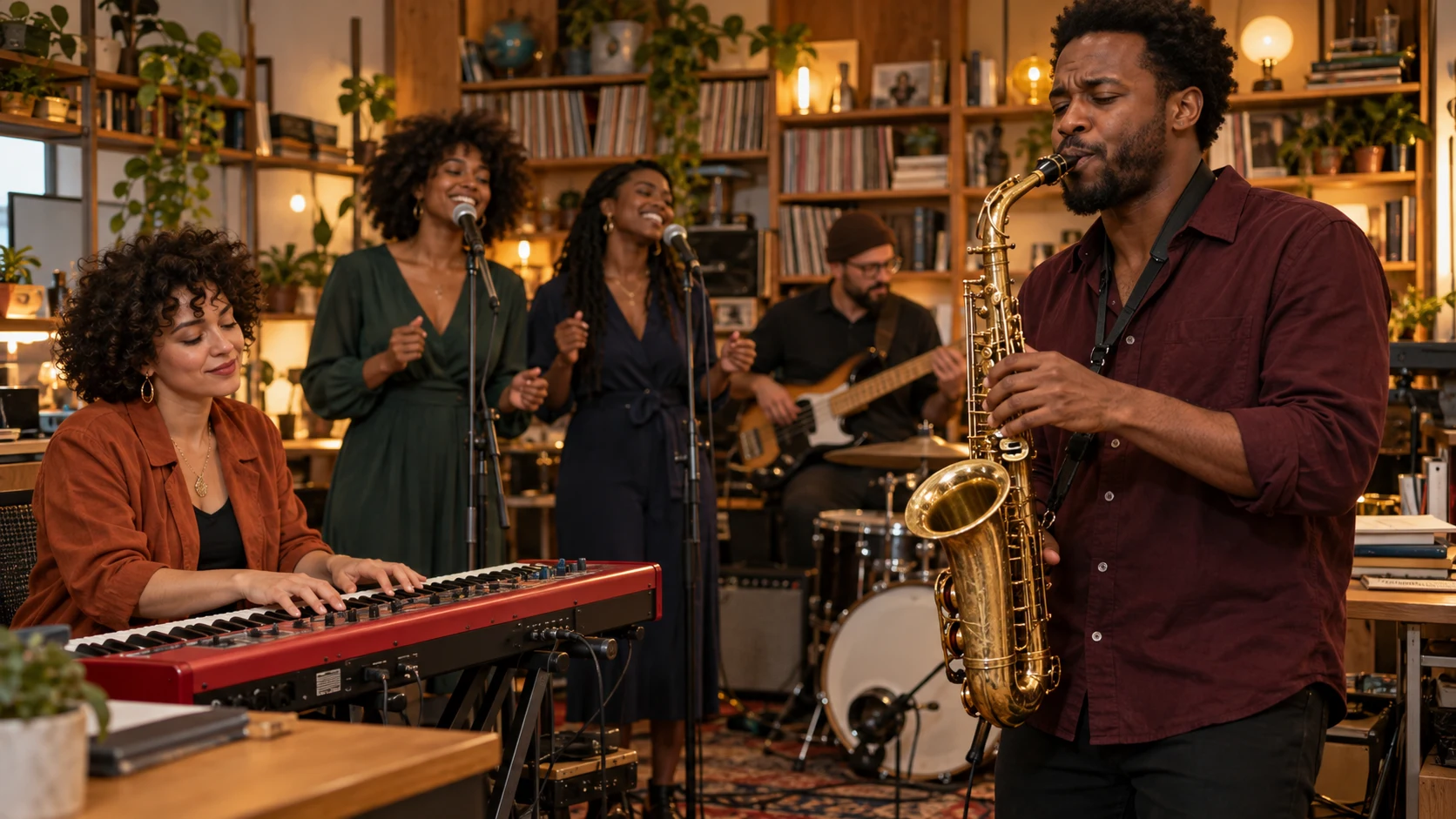
An Outstanding Tiny Desk AI video feels grounded when the opening establishes who is playing together. A seated keyboard player anchors the foreground, with backing singers standing close behind. Keep their movements modest: a shoulder sway, a nod, or a small smile. Books, cables, and a desk make the space feel lived in. Avoid asking every performer to make a different dramatic gesture at once.
Create my office band
Saxophonist beside a red keyboard and backing singers in a warm office
A saxophone feature beside the keyboard brings a playful instrumental moment to your Outstanding Tiny Desk AI video.

Let the smile carry the close-up

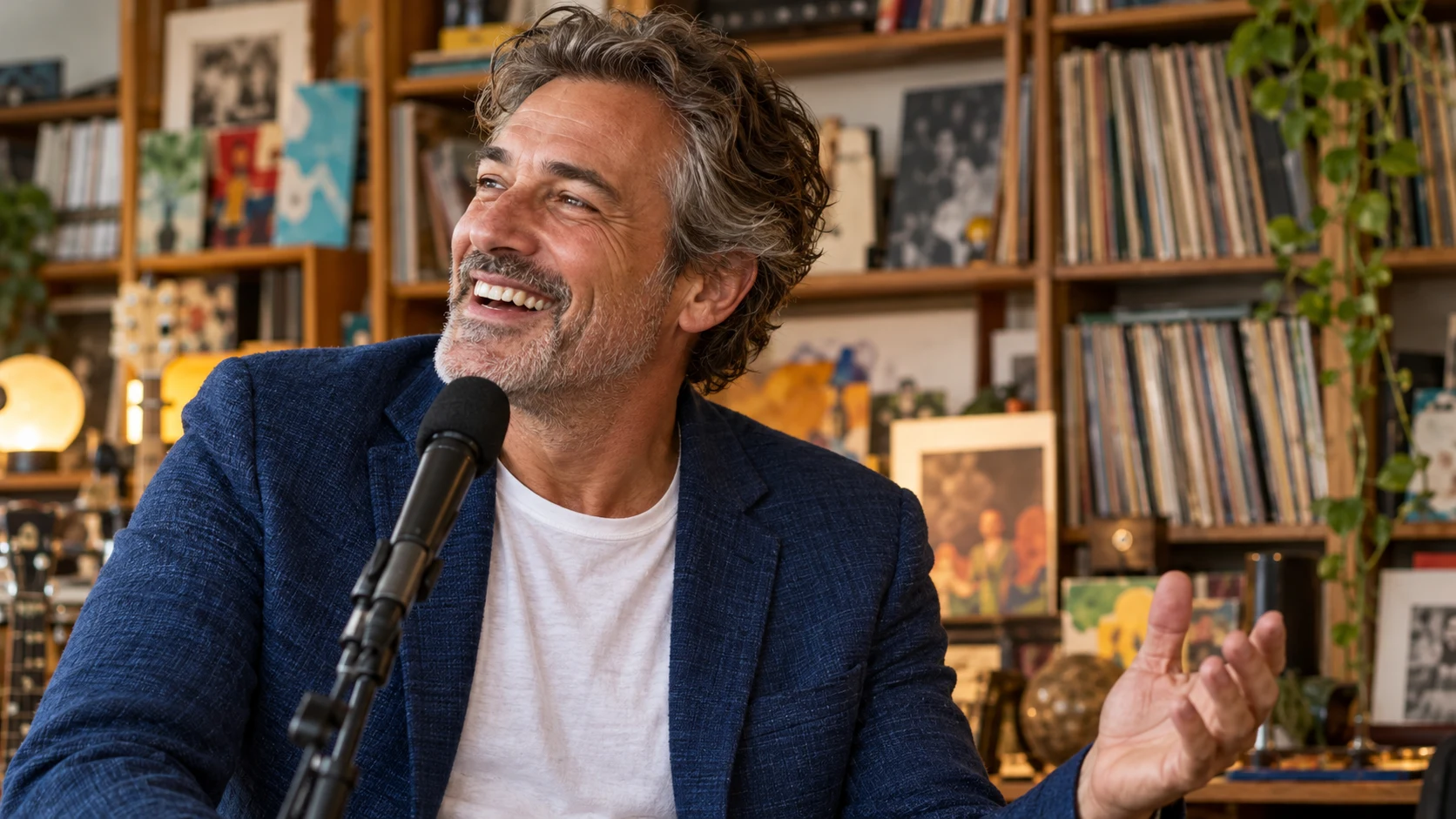
The lead’s expression is the emotional center of an Outstanding Tiny Desk AI video. A slight turn toward the musicians followed by a broad smile creates an enjoyable reaction. Use a clear reference with the face unobstructed, and keep the microphone below the eyes. A brief hand lift near the chest is easier to read than a complicated gesture passing across the face.

Put my lead in the spotlight
Smiling fictional vocalist beside a microphone with bookshelves behind
A broad smile, a close microphone, and warm bookshelves put the lead singer at the heart of the performance.

Add a playful saxophone response

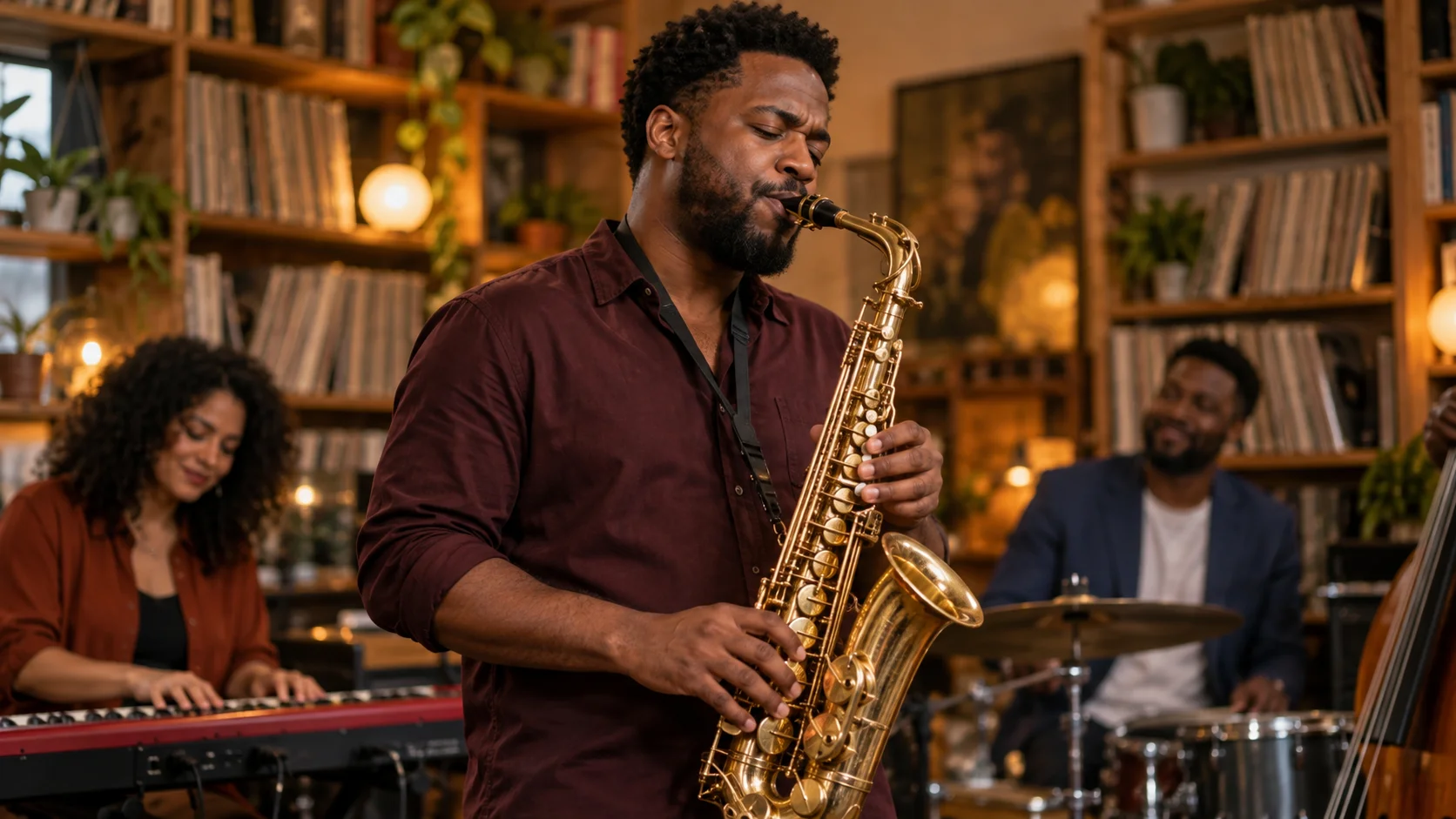
A short saxophone feature gives your Outstanding Tiny Desk AI video a playful change of focus. Keep the player’s stance relaxed and the instrument inside the frame, then return to the ensemble for a shared finish. Review the mouthpiece, fingers, and instrument shape closely. Generated playing can suggest a performance without reproducing technically accurate fingering or a particular musical phrase.

Start my band performance
Saxophonist in a burgundy shirt playing a brass saxophone beside an office band
Warm brass tones and a relaxed saxophone solo give your Outstanding Tiny Desk AI video a playful change of focus.

How to create an Outstanding Tiny Desk AI video

  1. 01

    Choose and upload your cast

    Add one to five JPEG, PNG, or WebP images, each within the 10 MB upload limit. Use one person per image with a sharp face, visible shoulders, and even lighting. The first reference guides the featured lead. Additional references guide the keyboard player, saxophonist, and two backing singers in that order. With fewer references, the prepared direction asks for fictional bandmates.

  2. 02

    Choose the format and duration

    Start your Outstanding Tiny Desk AI video at 480p, 9:16, and 15 seconds. Choose any whole-second duration from 10 through 15. Landscape and square ratios are also available when they suit your composition. The 768p and 1080p options provide higher-resolution output settings; check the current credit estimate after changing resolution or duration, since those choices affect the generation cost.

  3. 03

    Generate the performance

    The performance direction is already prepared, so there is no prompt field to fill in. Choose your reference photos and video settings, and keep the band roles consistent with your reference order. Sign in, review the selected images and estimate, then submit. Wait for the request status to finish before evaluating the resulting performance.

  4. 04

    Watch, download, and finish your edit

    Play the whole Outstanding Tiny Desk AI video before downloading it. Check face consistency across cuts, hands at the keyboard, saxophone contact, and the final frame. Listen to the generated audio too. You can replace the soundtrack or add a caption in your preferred editor. Choose a version where the expression reads clearly and the joke works immediately.

AI Video Generators for Your Next Project

Turn a photo into a short video for a personal story, a social post, or a playful idea.

  • Baby Born with a Mustache

  • Stones to Castle AI

  • Skull Cap Trend AI

Choose settings for your Outstanding Tiny Desk AI video

Use the first render to judge the cast and performance rather than changing every setting at once. A simple opening, a smiling close-up, and a brief instrumental response can communicate the concept within the available duration.

Fifteen seconds gives the ensemble and featured performer more room. Ten seconds suits a brisk reaction clip, but the performance may combine or shorten requested beats. These directions are creative guidance rather than an exact editing timeline. If one moment matters most, name it in your optional note and keep the other actions restrained.

Vertical 9:16 emphasizes the featured face on a phone. A wider frame can show more of the keyboard and the relationship between musicians. Square can suit a compact group composition. Select the ratio before generating your Outstanding Tiny Desk AI video, then inspect whether the important faces and instruments remain comfortably inside the resulting frame.

The upload interface uses a 10 MB label for a per-image limit of 10 MiB, or 10,485,760 bytes. Large file size alone does not make a better reference: sharp facial details and balanced light matter more. Avoid dark screenshots, tiny faces, and heavy filters. One well-prepared portrait is a useful starting point before trying a larger cast.

Find an occasion for your Outstanding Tiny Desk AI video

A familiar cast makes the desk-concert format personal. Turn an everyday reaction, a birthday, or a shared achievement into a short performance where the faces and expressions tell the story.

Give your group chat a house band

An Outstanding Tiny Desk AI video gives a running joke a recognizable cast. Put the friend known for dramatic reactions in the lead and let the others take the keyboard, saxophone, and backing vocals. The warm office setting makes an ordinary group feel like a band enjoying its favorite rehearsal. Choose a shared moment everyone can laugh about, then add a brief caption in your editor to give the performance its context.

Make a birthday feel like an encore

Give the birthday person the spotlight in an Outstanding Tiny Desk AI video, with a smiling close-up as the central moment. One portrait can lead a fictional backing band, while extra photos bring friends into the scene. A compact performance fits naturally into a birthday message or a longer greeting montage. Add the name and dedication after generation so the message stays readable without competing with the singer’s expression.

Celebrate a team milestone together

An Outstanding Tiny Desk AI video can mark a finished project, a club anniversary, or the end of a busy season. Cast teammates across the band so the celebration feels shared. A wider composition gives the keyboard, saxophone, and supporting performers room to appear together. Pair the finished clip with a short message about the achievement, and choose a closing moment where the group’s relaxed smiles carry the celebration.

Outstanding Tiny Desk AI questions

No. One reference image is enough for a featured lead with fictional bandmates. You can add up to five images to guide more roles. Separate portraits with similar lighting are easier to describe clearly than a crowded group picture. Reference images guide identity, but a perfect likeness or exact role assignment is not guaranteed.

This page does not supply the original Outstanding recording. Its prepared direction requests original soul-funk music with brief lead vocals, backing harmonies, and a featured saxophone solo while the singers pause. Listen to the result before use. If you want the familiar song, add an available track through your posting platform or another source you are entitled to use.

No. Photos describe appearance, not a full sequence of motion. This tool generates a new scene with a similar room, band arrangement, and joyful energy. Cuts and gestures may differ or merge. Exact footage editing and synchronized reproduction of a specific recording are outside this photo-only workflow.

Choose an integer duration from 10 to 15 seconds; the default is 15. The longer setting leaves more space for the close-up and saxophone insert. For a shorter result, simplify the optional direction. The selected duration sets the clip length, while the exact timing of each performance moment can vary.

Generation uses credits. Sign in to see your balance and review the current estimate before submitting. Any available free credits can cover a request when the balance is sufficient. Changing resolution or duration may change the estimate. The page does not promise unlimited free renders or a fixed completion time.

Start with a clearer lead portrait, reduce the cast if identities drift, and simplify large gestures. Keep hands away from faces and avoid requesting fast camera moves. Check the output at normal speed and pause around each cut. Change one detail between attempts so you can see whether that adjustment helped.

No. This is an independent creation tool inspired by a recognizable desk-concert format. The page showcases an office-band setting with its own cast and performance. Use photos you are allowed to upload, keep your presentation clearly fictional, and identify an AI-generated performance when sharing it.

Ready to create your Outstanding Tiny Desk AI video?

Give your photos a stage and your friends a place in the band. Upload one to five portraits, choose a 10–15 second performance, and turn a familiar cast into a joyful office concert. Start with 480p and vertical 9:16, or choose the format that fits your story.

Upload photos & create my video
Image to Image AI logoImage to Image AI

A fresh take on your image. Explore new styles and scenes with AI.

Customer supportsupport@imgtoimageai.com

Tools

  • Remove Glare from Glasses
  • Remove Glare from Photo
  • Photo to Line Art
  • Image Upscaler
  • Realistic Selfie Generator
  • Christmas Photobooth
  • AI 3D Figure Generator
  • Selfie With Santa
  • Christmas Dance Trend
  • Motorcycle AI
  • AI Photo Booth
  • Photo to Sticker
  • QR Code Enhancer
  • AI Long Hair Filter
  • Bicep Heart Trend AI
  • Happy Birthday GIF with Name
  • Apartment Dance
  • AI GIF Generator
  • Executive Portrait Maker
  • AI Trouble Maker Video

Learn more

  • Tools
  • Blog
  • Pricing

Legal

  • Privacy Policy
  • Terms of Service
  • Refund Policy
  • Contact

© 2026 Image to Image AI